Talos Linux
Prerequsites
- talosctl
- kubectl
Just a note that when using Rufus to burn the Talos ISO, if theres a pre-existing OS inside the servers, we need to burn the ISO using the dd mode otherwise, it doesn’t boot into Talos ISO
Also, we need to manually set up IP addresses by connecting the keyboard to the bare metal servers. Or we can just specify DHCP addresses in the router.
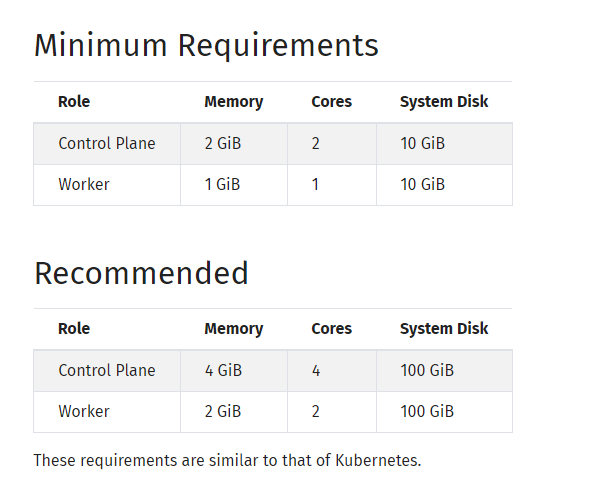
System Requirements
Boot with the ISO file in a bootable usb or anything else on bare metal (I am using mini pcs)
First need to generate secrets.yaml
talosctl gen secrets

ls
secrets.yaml
Talos Patch Configs
## cni & pod-svc cidr patch
---
cluster:
  network:
    cni:
      name: none
    podSubnets:
      - 172.31.0.0/16
    serviceSubnets:
      - 10.96.0.0/12
  proxy:
    disabled: true
## allow master to schedule pods
---
cluster:
  allowSchedulingOnControlPlanes: true
## rename the eth interface
---
machine:
  install:
    extraKernelArgs:
      - net.ifnames=0
## setup VIP for k8s load balancing
---
machine:
  network:
    interfaces:
        - interface: eth0
          vip:
              ip: 192.168.219.250
Generate configuration files using the above patches
mkdir -p rendered
talosctl gen config home-cluster https://192.168.219.250:6443 --with-secrets secrets.yaml --config-patch @vip.yaml --config-patch @cni.yaml --config-patch @inf-name.yaml --config-patch @master-allow.yaml --output rendered/
Then under rendered directory, we will have 3 new files
ls rendered
controlplane.yaml  talosconfig  worker.yaml
We can change kubernetes versions by changing the k8s component versions inside the controlplane.yaml & worker.yaml
Now apply
talosctl apply -f rendered/controlplane.yaml -n 192.168.219.245 --insecure
So the installation for talos cluster will begin. Meanwhile we can set the context for talosctl
## Just like .kube
mkdir -p ~/.talos
cp rendered/talosconfig ~/.talos/config

talosctl config contexts
CURRENT   NAME           ENDPOINTS   NODES
*         home-cluster   127.0.0.1

## Need to change the ep
talosctl config endpoint 192.168.219.245

talosctl config contexts
CURRENT   NAME           ENDPOINTS         NODES
*         home-cluster   192.168.219.245
We can validate if the talos cluster has been set up
talosctl get members -n 192.168.219.245
NODE              NAMESPACE   TYPE     ID         VERSION   HOSTNAME   MACHINE TYPE   OS               ADDRESSES
192.168.219.245   cluster     Member   master01   1         master01   controlplane   Talos (v1.6.6)   ["192.168.219.245"]
Now need to bootstrap K8s
talosctl bootstrap -n 192.168.219.245
Then monitor the process using the dashboard command.
talosctl dashboard -n 192.168.219.245

Okay as we have not set up CNI, the READY status should be False. Other componets for K8s control plane are up and running so now we can retrieve our kubeconfig file and talk with the kube api
talosctl kubeconfig -n 192.168.219.245

kubectl get no
NAME       STATUS     ROLES           AGE   VERSION
master01   NotReady   control-plane   82s   v1.28.4

## Note that the above talosctl kubeconfig command automatically creates .kube directory and copies the config file under it
cat ~/.kube/config

apiVersion: v1
kind: Config
clusters:
- name: home-cluster
  cluster:
    server: https://192.168.219.250:6443  ## ==> The VIP address
We can see our pods too
kubectl get po -A
NAMESPACE     NAME                               READY   STATUS    RESTARTS        AGE
kube-system   coredns-c78fdf99-29lc9             0/1     Pending   0               2m29s
kube-system   coredns-c78fdf99-6gbp6             0/1     Pending   0               2m29s
kube-system   kube-apiserver-master01            1/1     Running   0               96s
kube-system   kube-controller-manager-master01   1/1     Running   1 (2m52s ago)   77s
kube-system   kube-scheduler-master01            1/1     Running   1 (2m54s ago)   91s
Now lets boot from ISO for 2 other master nodes and run the following for each of them
talosctl apply -f rendered/controlplane.yaml -n 192.168.219.246 --insecure
talosctl apply -f rendered/controlplane.yaml -n 192.168.219.247 --insecure
By the way its always a good practice to check the disk format as some could go /dev/vda (mostly in Virtual Machines)
talosctl disks --insecure --nodes 192.168.219.246
DEV        MODEL        SERIAL   TYPE   UUID   WWID                                                               MODALIAS      NAME   SIZE    BUS_PATH                                                               SUBSYSTEM          READ_ONLY   SYSTEM_DISK
/dev/sda   Kston 64GB   -        SSD    -      t10.ATA     Kston 64GB                              202101032249   scsi:t-0x00   -      64 GB   /pci0000:00/0000:00:12.0/ata1/host0/target0:0:0/0:0:0:0/               /sys/class/block
Master02 Up

kubectl get no
NAME       STATUS     ROLES           AGE   VERSION
master01   NotReady   control-plane   11m   v1.28.4
master02   NotReady   control-plane   44s   v1.28.4
Master03 Up

kubectl get no
NAME       STATUS     ROLES           AGE     VERSION
master01   NotReady   control-plane   20m     v1.28.4
master02   NotReady   control-plane   9m22s   v1.28.4
master03   NotReady   control-plane   62s     v1.28.4
Okay now we wanna reconfigure the talosctl endpoints
talosctl config endpoint 192.168.219.245 192.168.219.246 192.168.219.247

talosctl config contexts
CURRENT   NAME           ENDPOINTS                                         NODES
*         home-cluster   192.168.219.245,192.168.219.246,192.168.219.247
Now to install Cilium we require helm
helm version
version.BuildInfo{Version:"v3.14.2", GitCommit:"c309b6f0ff63856811846ce18f3bdc93d2b4d54b", GitTreeState:"clean", GoVersion:"go1.21.7"}
I already got my cilium helm chart ready with some customized values and talos configuration ready as well. Refer here for more details: https://www.talos.dev/v1.6/kubernetes-guides/network/deploying-cilium/
helm install cilium cilium -n kube-system
NAME: cilium
LAST DEPLOYED: Sat Mar  9 17:17:22 2024
NAMESPACE: kube-system
STATUS: deployed
REVISION: 1
TEST SUITE: None
NOTES:
You have successfully installed Cilium with Hubble Relay and Hubble UI.

Your release version is 1.15.1.

For any further help, visit https://docs.cilium.io/en/v1.15/gettinghelp
Checking pods
k get po -n kube-system
NAME                               READY   STATUS    RESTARTS      AGE
cilium-5n6ww                       1/1     Running   0             87s
cilium-hgx6z                       1/1     Running   0             87s
cilium-operator-58c6c9cb55-f4f6x   1/1     Running   0             87s
cilium-operator-58c6c9cb55-gkw8r   1/1     Running   0             87s
cilium-xzn72                       1/1     Running   0             87s
coredns-c78fdf99-29lc9             1/1     Running   0             30m
coredns-c78fdf99-6gbp6             1/1     Running   0             30m
hubble-relay-69f5fc5b79-cwrng      1/1     Running   0             87s
hubble-ui-6548d56557-pdkzz         2/2     Running   0             87s
kube-apiserver-master01            1/1     Running   0             30m
kube-apiserver-master02            1/1     Running   0             19m
kube-apiserver-master03            1/1     Running   0             11m
kube-controller-manager-master01   1/1     Running   1 (31m ago)   29m
kube-controller-manager-master02   1/1     Running   0             19m
kube-controller-manager-master03   1/1     Running   0             11m
kube-scheduler-master01            1/1     Running   1 (31m ago)   29m
kube-scheduler-master02            1/1     Running   0             19m
kube-scheduler-master03            1/1     Running   0             11m
Check if the k8s is actually able to run workloads and cilium is actually doing the kube-proxy work
## Got a sample deployment
cat test.yaml

apiVersion: apps/v1
kind: Deployment
metadata:
  name: my-nginx
spec:
  selector:
    matchLabels:
      run: my-nginx
  replicas: 2
  template:
    metadata:
      labels:
        run: my-nginx
    spec:
      containers:
      - name: my-nginx
        image: nginx
        ports:
        - containerPort: 80

k apply -f test.yaml
deployment.apps/my-nginx created

k get po
NAME                        READY   STATUS    RESTARTS   AGE
my-nginx-684dd4dcd4-lb2p7   1/1     Running   0          20s
my-nginx-684dd4dcd4-qfsh2   1/1     Running   0          20s

k get svc
NAME         TYPE        CLUSTER-IP     EXTERNAL-IP   PORT(S)        AGE
kubernetes   ClusterIP   10.96.0.1      <none>        443/TCP        33m
my-nginx     NodePort    10.102.35.52   <none>        80:32332/TCP   20s

k -n kube-system exec ds/cilium -- cilium-dbg service list
Defaulted container "cilium-agent" out of: cilium-agent, config (init), mount-bpf-fs (init), clean-cilium-state (init), install-cni-binaries (init)
ID   Frontend                Service Type   Backend
1    10.96.0.1:443           ClusterIP      1 => 192.168.219.245:6443 (active)
                                            2 => 192.168.219.246:6443 (active)
                                            3 => 192.168.219.247:6443 (active)
2    10.111.22.182:443       ClusterIP      1 => 192.168.219.245:4244 (active)
3    10.107.123.24:80        ClusterIP      1 => 172.31.0.199:4245 (active)
4    10.105.206.204:80       ClusterIP      1 => 172.31.0.10:8081 (active)
5    10.96.0.10:53           ClusterIP      1 => 172.31.0.105:53 (active)
                                            2 => 172.31.0.3:53 (active)
6    10.96.0.10:9153         ClusterIP      1 => 172.31.0.105:9153 (active)
                                            2 => 172.31.0.3:9153 (active)
7    10.102.35.52:80         ClusterIP      1 => 172.31.2.14:80 (active)
                                            2 => 172.31.1.40:80 (active)
8    0.0.0.0:32332           NodePort       1 => 172.31.2.14:80 (active)
                                            2 => 172.31.1.40:80 (active)
9    192.168.219.245:32332   NodePort       1 => 172.31.2.14:80 (active)
                                            2 => 172.31.1.40:80 (active)
Node Exporter not being deployed
Talos enforces some kind of Pod Security Admission control by default. More on : https://www.talos.dev/v1.6/kubernetes-guides/configuration/pod-security/
Basically it excludes the kube-system namespace only.
This needs to be configured before installing the cluster. But we can ‘bypass’ this using the following label in the namespace
apiVersion: v1
kind: Namespace
metadata:
  creationTimestamp: "2024-03-09T09:31:31Z"
  labels:
    kubernetes.io/metadata.name: monitoring
    pod-security.kubernetes.io/enforce: privileged  ## ==> This option
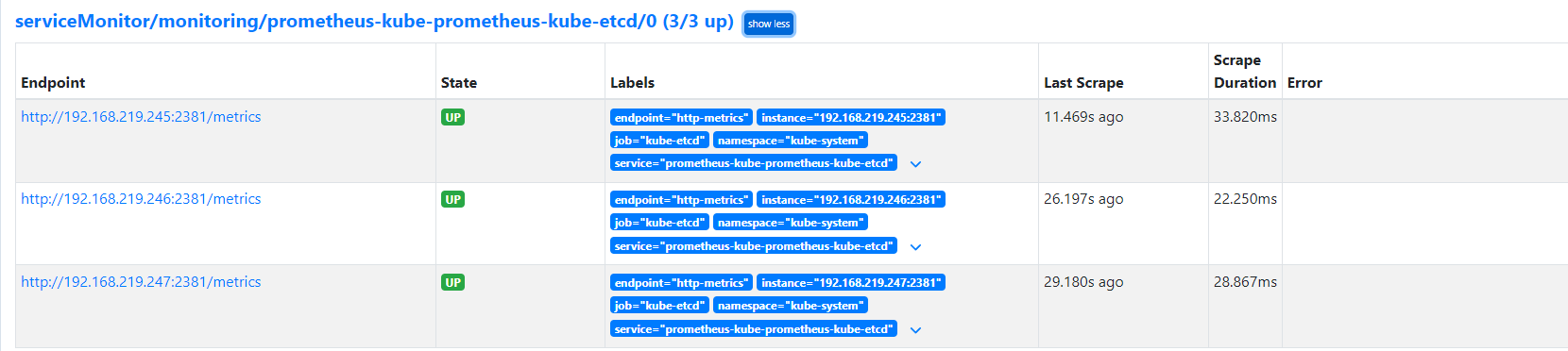
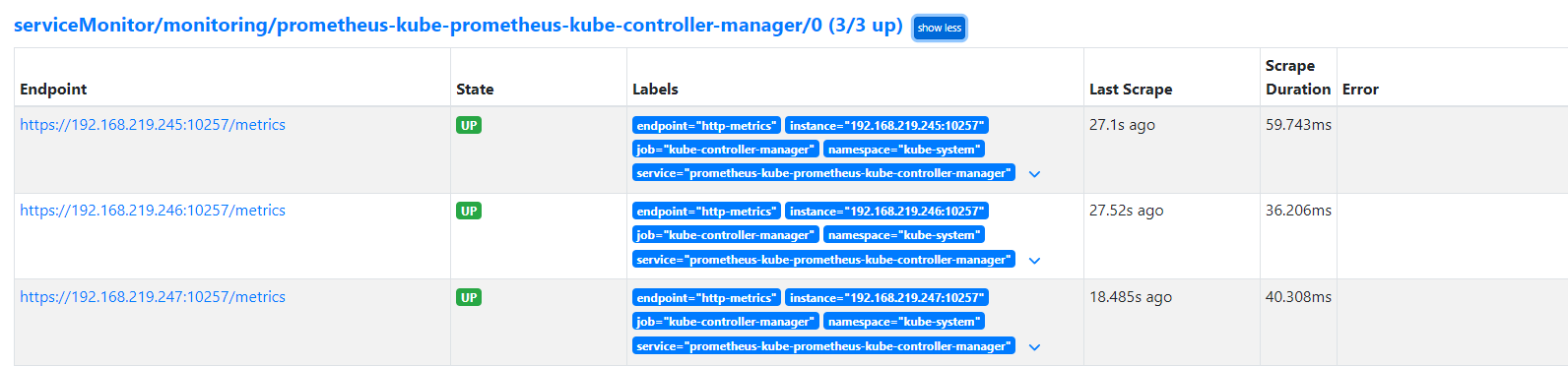
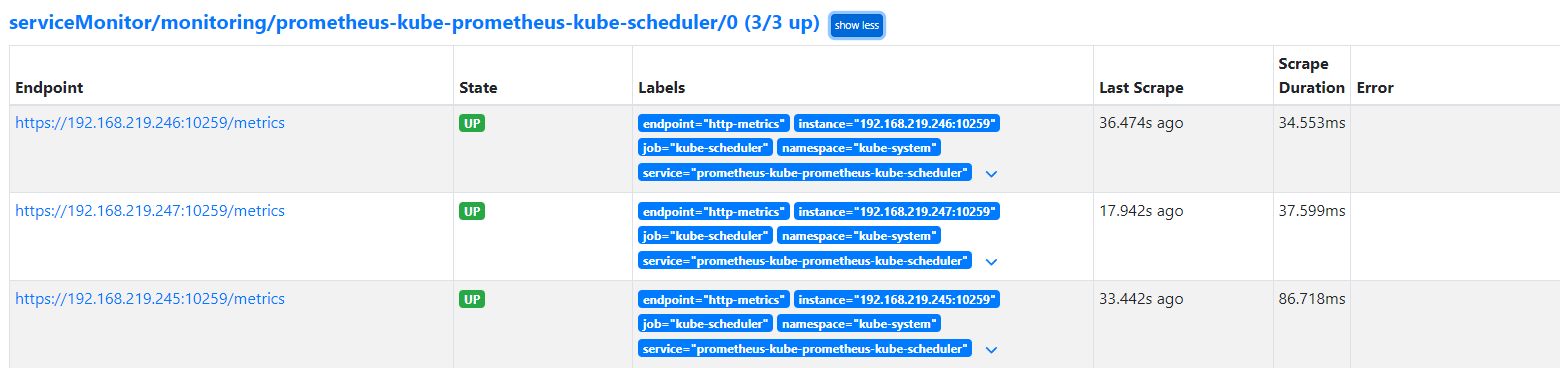
ETCD, Controller, Scheduler Monitoring for Prometheus
## In kube-prometheus-stack helm chart
kubeControllerManager:
  enabled: true

  endpoints:
    - 192.168.219.245
    - 192.168.219.246
    - 192.168.219.247

kubeScheduler:
  enabled: true

  endpoints:
    - 192.168.219.245
    - 192.168.219.246
    - 192.168.219.247


kubeEtcd:
  enabled: true

  ## If your etcd is not deployed as a pod, specify IPs it can be found on
  endpoints:
    - 192.168.219.245
    - 192.168.219.246
    - 192.168.219.247
  service:
    enabled: true
    port: 2381
    targetPort: 2381
## In talos controlplane.yaml config
   controllerManager:
        image: registry.k8s.io/kube-controller-manager:v1.28.4
        ## Add these lines
        extraArgs:
          bind-address: 0.0.0.0

    scheduler:
        image: registry.k8s.io/kube-scheduler:v1.28.4
        ## Add these lines
        extraArgs:
          bind-address: 0.0.0.0
    etcd:
        ca:
            crt: LS0tLS1CRUdJTiBDRVJUSUZJQ0FURS0tLS0tCk1JSUJmVENDQVNPZ0F3SUJBZ0lRVDJmd3I4R3dEUmVHcFRBMXZObW9BREFLQmdncWhrak9QUVFEQWpBUE1RMHcKQ3dZRFZRUUtFd1JsZEdOa01CNFhEVEkwTURNd09UQTNNREF5TVZvWERUTTBNRE13TnpBM01EQXlNVm93RHpFTgpNQXNHQTFVRUNoTUVaWFJqWkRCWk1CTUdCeXFHU000OUFnRUdDQ3FHU000OUF3RUhBMElBQkhHYTl6WGd6bk9RCmVEVk5CdXlpUzdYeTNvcXRHUFFZaXFwbzFMVEhaeFRZVHozUGNZc2pTcmVUUlloNFh5K2djK1JyY2VPVWVEL0IKRWxNNkhKTzRrZkNqWVRCZk1BNEdBMVVkRHdFQi93UUVBd0lDaERBZEJnTlZIU1VFRmpBVUJnZ3JCZ0VGQlFjRApBUVlJS3dZQkJRVUhBd0l3RHdZRFZSMFRBUUgvQkFVd0F3RUIvekFkQmdOVkhRNEVGZ1FVVXhzSFFaSC9menU5Ck1BQWxaZm9DaDBDSU1XOHdDZ1lJS29aSXpqMEVBd0lEU0FBd1JRSWhBTUZXNG92VkpweGVoTFo2YVc4WHVpcjgKRngxTFRwelBFb1FFRWVYS1V1aG5BaUF3cmNaQmtQY1dKaTlISDdJSExyYmcvMWQwcDVXaUJTeU0zZnZONUsyUwpDdz09Ci0tLS0tRU5EIENFUlRJRklDQVRFLS0tLS0K
            key: LS0tLS1CRUdJTiBFQyBQUklWQVRFIEtFWS0tLS0tCk1IY0NBUUVFSUJ4UThjciszbFBNV2xTcEJpVlNXR29HMWdPbUNwRGVJWDBTblVQWERPbUhvQW9HQ0NxR1NNNDkKQXdFSG9VUURRZ0FFY1pyM05lRE9jNUI0TlUwRzdLSkx0ZkxlaXEwWTlCaUtxbWpVdE1kbkZOaFBQYzl4aXlOSwp0NU5GaUhoZkw2Qno1R3R4NDVSNFA4RVNVem9jazdpUjhBPT0KLS0tLS1FTkQgRUMgUFJJVkFURSBLRVktLS0tLQo=
        ## Add these lines
        extraArgs:
          listen-metrics-urls: http://0.0.0.0:2381
## Apply the new config and reboot the control-plane nodes
talosctl apply -f ../../talos-config/rendered/controlplane.yaml -n 192.168.219.246
Applied configuration without a reboot

talosctl reboot -n 192.168.219.246
watching nodes: [192.168.219.246]
    * 192.168.219.246: post check passed
Rook Ceph using 32GB USBs on each node
talosctl disks -n 192.168.219.245
NODE              DEV        MODEL        SERIAL   TYPE   UUID   WWID                                                               MODALIAS      NAME   SIZE    BUS_PATH                                                               SUBSYSTEM          READ_ONLY   SYSTEM_DISK
192.168.219.245   /dev/sda   Kston 64GB   -        SSD    -      t10.ATA     Kston 64GB                              202101032385   scsi:t-0x00   -      64 GB   /pci0000:00/0000:00:12.0/ata1/host0/target0:0:0/0:0:0:0/               /sys/class/block               *
192.168.219.245   /dev/sdb   Flash Disk   -        HDD    -      -                                                                  scsi:t-0x00   -      32 GB   /pci0000:00/0000:00:15.0/usb1/1-1/1-1:1.0/host2/target2:0:0/2:0:0:0/   /sys/class/block

talosctl disks -n 192.168.219.246
NODE              DEV        MODEL        SERIAL   TYPE   UUID   WWID                                                               MODALIAS      NAME   SIZE    BUS_PATH                                                               SUBSYSTEM          READ_ONLY   SYSTEM_DISK
192.168.219.246   /dev/sda   Kston 64GB   -        SSD    -      t10.ATA     Kston 64GB                              202101032249   scsi:t-0x00   -      64 GB   /pci0000:00/0000:00:12.0/ata1/host0/target0:0:0/0:0:0:0/               /sys/class/block               *
192.168.219.246   /dev/sdb   Flash Disk   -        HDD    -      -                                                                  scsi:t-0x00   -      32 GB   /pci0000:00/0000:00:15.0/usb1/1-1/1-1:1.0/host2/target2:0:0/2:0:0:0/   /sys/class/block

talosctl disks -n 192.168.219.247
NODE              DEV        MODEL        SERIAL   TYPE   UUID   WWID                                                               MODALIAS      NAME   SIZE    BUS_PATH                                                               SUBSYSTEM          READ_ONLY   SYSTEM_DISK
192.168.219.247   /dev/sda   Kston 64GB   -        SSD    -      t10.ATA     Kston 64GB                              202101032392   scsi:t-0x00   -      64 GB   /pci0000:00/0000:00:12.0/ata1/host0/target0:0:0/0:0:0:0/               /sys/class/block               *
192.168.219.247   /dev/sdb   Flash Disk   -        HDD    -      -                                                                  scsi:t-0x00   -      32 GB   /pci0000:00/0000:00:15.0/usb1/1-1/1-1:1.0/host2/target2:0:0/2:0:0:0/   /sys/class/block
Only need to deploy 2 helm charts
helm install rook-ceph rook-ceph -n rook-ceph
helm install rook-ceph-cluster rook-ceph-cluster/ -n rook-ceph
kubectl --namespace rook-ceph get cephcluster rook-ceph
NAME DATADIRHOSTPATH MONCOUNT AGE PHASE MESSAGE HEALTH EXTERNAL FSID
rook-ceph /var/lib/rook 3 9m Ready Cluster created successfully HEALTH_ERR 5ccb740f-fdc9-401d-90ee-e097e7177247
k get sc
NAME PROVISIONER RECLAIMPOLICY VOLUMEBINDINGMODE ALLOWVOLUMEEXPANSION AGE
ceph-block (default) rook-ceph.rbd.csi.ceph.com Delete Immediate true 9m2s
ceph-bucket rook-ceph.ceph.rook.io/bucket Delete Immediate false 9m2s
ceph-filesystem rook-ceph.cephfs.csi.ceph.com Delete Immediate true 9m2s
=== discontinued due to less memory ===
Added 128GB NVMEs and also have alot of free memory now
root@DESKTOP-LAJ2REG:~# talosctl disks -n 192.168.219.245
NODE              DEV            MODEL                    SERIAL                TYPE   UUID   WWID                                                                                                     MODALIAS      NAME   SIZE     BUS_PATH                                                   SUBSYSTEM          READ_ONLY   SYSTEM_DISK
192.168.219.245   /dev/nvme0n1   Patriot M.2 P300 128GB   P300EDBB23033101468   NVME   -      nvme.1e4b-50333030454442423233303333313031343638-50617472696f74204d2e322050333030203132384742-00000001   -             -      128 GB   /pci0000:00/0000:00:14.0/0000:03:00.0/nvme/nvme0/nvme0n1   /sys/class/block
192.168.219.245   /dev/sda       Kston 64GB               -                     SSD    -      t10.ATA     Kston 64GB                              202101032385                                         scsi:t-0x00   -      64 GB    /pci0000:00/0000:00:12.0/ata1/host0/target0:0:0/0:0:0:0/   /sys/class/block               *

root@DESKTOP-LAJ2REG:~# talosctl disks -n 192.168.219.246
NODE              DEV            MODEL                    SERIAL                TYPE   UUID   WWID                                                                                                     MODALIAS      NAME   SIZE     BUS_PATH                                                   SUBSYSTEM          READ_ONLY   SYSTEM_DISK
192.168.219.246   /dev/nvme0n1   Patriot M.2 P300 128GB   P300EDBB23033100983   NVME   -      nvme.1e4b-50333030454442423233303333313030393833-50617472696f74204d2e322050333030203132384742-00000001   -             -      128 GB   /pci0000:00/0000:00:14.0/0000:03:00.0/nvme/nvme0/nvme0n1   /sys/class/block
192.168.219.246   /dev/sda       Kston 64GB               -                     SSD    -      t10.ATA     Kston 64GB                              202101032249                                         scsi:t-0x00   -      64 GB    /pci0000:00/0000:00:12.0/ata1/host0/target0:0:0/0:0:0:0/   /sys/class/block               *

root@DESKTOP-LAJ2REG:~# talosctl disks -n 192.168.219.247
NODE              DEV            MODEL                    SERIAL                TYPE   UUID   WWID                                                                                                     MODALIAS      NAME   SIZE     BUS_PATH                                                   SUBSYSTEM          READ_ONLY   SYSTEM_DISK
192.168.219.247   /dev/nvme0n1   Patriot M.2 P300 128GB   P300EDBB23033101422   NVME   -      nvme.1e4b-50333030454442423233303333313031343232-50617472696f74204d2e322050333030203132384742-00000001   -             -      128 GB   /pci0000:00/0000:00:14.0/0000:03:00.0/nvme/nvme0/nvme0n1   /sys/class/block
192.168.219.247   /dev/sda       Kston 64GB               -                     SSD    -      t10.ATA     Kston 64GB                              202101032392                                         scsi:t-0x00   -      64 GB    /pci0000:00/0000:00:12.0/ata1/host0/target0:0:0/0:0:0:0/   /sys/class/block               *
=== discontinued due to less CPU ===