Kubeadm v1.29
Decided to install v1.29 K8s with Kubeadm in my home cluster
Got my 3 mini pcs ready with Ubuntu 20.04 LTS versions
Before starting I would recommend changing the hostnames for the nodes
sudo hostnamectl set-hostname <desired hostname for nodes>
Also talking with other nodes with a token is the best way
waji@master:~$ ssh-keygen
Generating public/private rsa key pair.
Enter file in which to save the key (/home/waji/.ssh/id_rsa):
Enter passphrase (empty for no passphrase):
Enter same passphrase again:
Your identification has been saved in /home/waji/.ssh/id_rsa
Your public key has been saved in /home/waji/.ssh/id_rsa.pub
The key fingerprint is:
SHA256:CWb0iAMo+N7KYA4GYtEWMPVofaBbg/byikxS9cviLjA waji@master
The key's randomart image is:
+---[RSA 3072]----+
|.+=o...          |
|+..+*o.o         |
|..o*+==..        |
|o.+.+=o. .       |
|+..+ .. S        |
|E+. +. .         |
|** ...o          |
|+.=...           |
| o +o            |
+----[SHA256]-----+


waji@master:~$ ssh-copy-id -i ~/.ssh/id_rsa.pub wk1
/usr/bin/ssh-copy-id: INFO: Source of key(s) to be installed: "/home/waji/.ssh/id_rsa.pub"
/usr/bin/ssh-copy-id: INFO: attempting to log in with the new key(s), to filter out any that are already installed
/usr/bin/ssh-copy-id: INFO: 1 key(s) remain to be installed -- if you are prompted now it is to install the new keys
waji@wk1's password:

Number of key(s) added: 1

Now try logging into the machine, with:   "ssh 'wk1'"
and check to make sure that only the key(s) you wanted were added.

waji@master:~$ ssh-copy-id -i ~/.ssh/id_rsa.pub wk2
/usr/bin/ssh-copy-id: INFO: Source of key(s) to be installed: "/home/waji/.ssh/id_rsa.pub"
/usr/bin/ssh-copy-id: INFO: attempting to log in with the new key(s), to filter out any that are already installed
/usr/bin/ssh-copy-id: INFO: 1 key(s) remain to be installed -- if you are prompted now it is to install the new keys
waji@wk2's password:

Number of key(s) added: 1

Now try logging into the machine, with:   "ssh 'wk2'"
and check to make sure that only the key(s) you wanted were added.
First step for each node is always
sudo apt update && sudo apt upgrade -y
After updating, install kubernetes packages with the following command
sudo apt-get install -y apt-transport-https ca-certificates curl
Then we run the public signing key for the k8s package repos
curl -fsSL https://pkgs.k8s.io/core:/stable:/v1.29/deb/Release.key | sudo gpg --dearmor -o /etc/apt/keyrings/kubernetes-apt-keyring.gpgIf the above doesn’t work, we need to first create the keyrings directory
sudo mkdir -p -m 755 /etc/apt/keyrings
Then we add Kubernetes apt repo using
echo 'deb [signed-by=/etc/apt/keyrings/kubernetes-apt-keyring.gpg] https://pkgs.k8s.io/core:/stable:/v1.29/deb/ /' | sudo tee /etc/apt/sources.list.d/kubernetes.list
Our kubernetes repo has been configured now we wanna turn off swap
waji@waji:~$ free -h
              total        used        free      shared  buff/cache   available
Mem:          7.6Gi       217Mi       6.2Gi       1.0Mi       1.2Gi       7.1Gi
Swap:         4.0Gi          0B       4.0Gi

## Currently on
## Turn off by
waji@waji:~$ sudo vi /etc/fstab
#/swap.img	none	swap	sw	0	0

# Reboot the system and check swap status
waji@waji:~$ free -h
              total        used        free      shared  buff/cache   available
Mem:          7.6Gi       174Mi       7.1Gi       1.0Mi       353Mi       7.2Gi
Swap:            0B          0B          0B
Well the k8s official kubeadm installation guide tells us to Verify the MAC address and product_uuid are unique for every node which is true in our case as I am deploying literally baremetal. They say that some VMs can get product_uuid same to each other. But we should check I guess. Same for the MAC addresses for the network interface on each node. “If these values are not unique to each node, the installation process may fail” K8s Documentation → https://github.com/kubernetes/kubeadm/issues/31
ip link
sudo cat /sys/class/dmi/id/product_uuid

## Or we can check machine ID as well
sudo cat /etc/machine-id
product_uuid is main board product UUID(set by the board manufacturer) and may be used to identify a mainboard.
machine-id is a unique id specific to a linux installation. (k8s just needs a unique identifier, so machine-id should work)
Now we need to enable required ports and protocols obviously
Control plane
Worker node
We can either open them using firewalld or just disable the firewall altogether.
waji@waji:~$ sudo systemctl status firewalld
Unit firewalld.service could not be found.
Now we need a Container Runtime to be installed and available in
Now before installing a CRI, we need to enable two kernel modules, overlay & br_netfilter
The below steps are defined as → Forwarding IPv4 and letting iptables see bridged traffic in K8s documentation
cat <<EOF | sudo tee /etc/modules-load.d/k8s.conf
overlay
br_netfilter
EOF

sudo modprobe overlay
sudo modprobe br_netfilter

# sysctl params required by setup, params persist across reboots
cat <<EOF | sudo tee /etc/sysctl.d/k8s.conf
net.bridge.bridge-nf-call-iptables  = 1
net.bridge.bridge-nf-call-ip6tables = 1
net.ipv4.ip_forward                 = 1
EOF

# Apply sysctl params without reboot
sudo sysctl --system
To confirm that the above modules have been successfully enabled
waji@waji:~$ lsmod | grep br_netfilter
br_netfilter           28672  0
bridge                176128  1 br_netfilter

waji@waji:~$ lsmod | grep overlay
overlay               118784  0
Also, the documentation says → “Verify that the net.bridge.bridge-nf-call-iptables, net.bridge.bridge-nf-call-ip6tables, and net.ipv4.ip_forward system variables are set to 1 in your sysctl config by running the following command:”
waji@waji:~$ sysctl net.bridge.bridge-nf-call-iptables net.bridge.bridge-nf-call-ip6tables net.ipv4.ip_forward
net.bridge.bridge-nf-call-iptables = 1
net.bridge.bridge-nf-call-ip6tables = 1
net.ipv4.ip_forward = 1
Before installing the CRI, theres an important point regarding the cgroupfsand systemd drivers.
- The
cgroupfsdriver is the default cgroup driver in the kubelet. - The
cgroupfsdriver is not recommended when systemd is the init system because systemd expects a single cgroup manager on the system. - if you use cgroup v2, use the
systemdcgroup driver instead ofcgroupfs
More details regarding cgroup and systemd drivers and cautions can be found here:
https://kubernetes.io/docs/setup/production-environment/container-runtimes/#cgroup-drivers
They say that after v1.22, kubeadm defaults systemd driver
Basically we can confirm that by using
waji@waji:~$ sudo ps -p 1 -o comm=
systemd
Yes, now we can install containerd as the CRI (coz why not?)
First, set up the persistent loading of the required Containerd modules by running the following commands on each Node to allow iptables Bridged Traffic:
sudo tee /etc/modules-load.d/containerd.conf << EOF
overlay
br_netfilter
EOF

## Dont forget to reload
sudo sysctl --system
Installing necessary dependencies
sudo apt install curl gnupg2 software-properties-common apt-transport-https ca-certificates -y
Adding GPG keys
waji@waji:~$ curl -fsSL https://download.docker.com/linux/ubuntu/gpg | sudo apt-key add -
OK
Finally adding the repository
sudo add-apt-repository "deb [arch=amd64] https://download.docker.com/linux/ubuntu $(lsb_release -cs) stable"
Installing containerd
sudo apt update
sudo apt install containerd.io -y
After successful installation of containerd, we need to load the containerd configurations
waji@waji:~$ sudo mkdir -p /etc/containerd

waji@waji:~$ sudo containerd config default>/etc/containerd/config.toml
-bash: /etc/containerd/config.toml: Permission denied

## The above can happen so...
waji@waji:~$ sudo su - root
root@waji:~# containerd config default>/etc/containerd/config.toml

root@waji:~# systemctl restart containerd
root@waji:~# systemctl enable containerd
root@waji:~# systemctl status containerd
● containerd.service - containerd container runtime
     Loaded: loaded (/lib/systemd/system/containerd.service; enabled; vendor preset: enabled)
     Active: active (running) since Thu 2024-02-29 17:02:04 UTC; 7s ago
       Docs: https://containerd.io
Finally we can install kubelet, kubeadm and kubectl!
sudo apt install kubelet kubeadm kubectl
Before kubeadm init, i would highly recommend going through Kubernetes official documentation regarding initlalizing the control-plane node as it discuess on some key points regarding some important args for the kubeadm init command.
Also, I would like to share the init workflow documentation: https://kubernetes.io/docs/reference/setup-tools/kubeadm/kubeadm-init/#init-workflow
Here goes nothing!
sudo kubeadm init --pod-network-cidr 172.31.0.0/16 --service-cidr 10.96.0.0/12 --apiserver-advertise-address 192.168.219.245
waji@waji:~$ sudo kubeadm init --pod-network-cidr 172.31.0.0/16 --service-cidr 10.96.0.0/12 --apiserver-advertise-address 192.168.219.245
[init] Using Kubernetes version: v1.29.2
[preflight] Running pre-flight checks
[preflight] Pulling images required for setting up a Kubernetes cluster
[preflight] This might take a minute or two, depending on the speed of your internet connection
[preflight] You can also perform this action in beforehand using 'kubeadm config images pull'
W0229 17:39:00.734262    3550 checks.go:835] detected that the sandbox image "registry.k8s.io/pause:3.6" of the container runtime is inconsistent with that used by kubeadm. It is recommended that using "registry.k8s.io/pause:3.9" as the CRI sandbox image.
[certs] Using certificateDir folder "/etc/kubernetes/pki"
[certs] Generating "ca" certificate and key
[certs] Generating "apiserver" certificate and key
[certs] apiserver serving cert is signed for DNS names [kubernetes kubernetes.default kubernetes.default.svc kubernetes.default.svc.cluster.local waji] and IPs [10.96.0.1 192.168.219.245]
[certs] Generating "apiserver-kubelet-client" certificate and key
[certs] Generating "front-proxy-ca" certificate and key
[certs] Generating "front-proxy-client" certificate and key
[certs] Generating "etcd/ca" certificate and key
[certs] Generating "etcd/server" certificate and key
[certs] etcd/server serving cert is signed for DNS names [localhost waji] and IPs [192.168.219.245 127.0.0.1 ::1]
[certs] Generating "etcd/peer" certificate and key
[certs] etcd/peer serving cert is signed for DNS names [localhost waji] and IPs [192.168.219.245 127.0.0.1 ::1]
[certs] Generating "etcd/healthcheck-client" certificate and key
[certs] Generating "apiserver-etcd-client" certificate and key
[certs] Generating "sa" key and public key
[kubeconfig] Using kubeconfig folder "/etc/kubernetes"
[kubeconfig] Writing "admin.conf" kubeconfig file
[kubeconfig] Writing "super-admin.conf" kubeconfig file
[kubeconfig] Writing "kubelet.conf" kubeconfig file
[kubeconfig] Writing "controller-manager.conf" kubeconfig file
[kubeconfig] Writing "scheduler.conf" kubeconfig file
[etcd] Creating static Pod manifest for local etcd in "/etc/kubernetes/manifests"
[control-plane] Using manifest folder "/etc/kubernetes/manifests"
[control-plane] Creating static Pod manifest for "kube-apiserver"
[control-plane] Creating static Pod manifest for "kube-controller-manager"
[control-plane] Creating static Pod manifest for "kube-scheduler"
[kubelet-start] Writing kubelet environment file with flags to file "/var/lib/kubelet/kubeadm-flags.env"
[kubelet-start] Writing kubelet configuration to file "/var/lib/kubelet/config.yaml"
[kubelet-start] Starting the kubelet
[wait-control-plane] Waiting for the kubelet to boot up the control plane as static Pods from directory "/etc/kubernetes/manifests". This can take up to 4m0s
[apiclient] All control plane components are healthy after 9.007172 seconds
[upload-config] Storing the configuration used in ConfigMap "kubeadm-config" in the "kube-system" Namespace
[kubelet] Creating a ConfigMap "kubelet-config" in namespace kube-system with the configuration for the kubelets in the cluster
[upload-certs] Skipping phase. Please see --upload-certs
[mark-control-plane] Marking the node waji as control-plane by adding the labels: [node-role.kubernetes.io/control-plane node.kubernetes.io/exclude-from-external-load-balancers]
[mark-control-plane] Marking the node waji as control-plane by adding the taints [node-role.kubernetes.io/control-plane:NoSchedule]
[bootstrap-token] Using token: qk6qli.9sirhcsowlxzom28
[bootstrap-token] Configuring bootstrap tokens, cluster-info ConfigMap, RBAC Roles
[bootstrap-token] Configured RBAC rules to allow Node Bootstrap tokens to get nodes
[bootstrap-token] Configured RBAC rules to allow Node Bootstrap tokens to post CSRs in order for nodes to get long term certificate credentials
[bootstrap-token] Configured RBAC rules to allow the csrapprover controller automatically approve CSRs from a Node Bootstrap Token
[bootstrap-token] Configured RBAC rules to allow certificate rotation for all node client certificates in the cluster
[bootstrap-token] Creating the "cluster-info" ConfigMap in the "kube-public" namespace
[kubelet-finalize] Updating "/etc/kubernetes/kubelet.conf" to point to a rotatable kubelet client certificate and key
[addons] Applied essential addon: CoreDNS
[addons] Applied essential addon: kube-proxy

Your Kubernetes control-plane has initialized successfully!

To start using your cluster, you need to run the following as a regular user:

  mkdir -p $HOME/.kube
  sudo cp -i /etc/kubernetes/admin.conf $HOME/.kube/config
  sudo chown $(id -u):$(id -g) $HOME/.kube/config

Alternatively, if you are the root user, you can run:

  export KUBECONFIG=/etc/kubernetes/admin.conf

You should now deploy a pod network to the cluster.
Run "kubectl apply -f [podnetwork].yaml" with one of the options listed at:
  https://kubernetes.io/docs/concepts/cluster-administration/addons/

Then you can join any number of worker nodes by running the following on each as root:

kubeadm join 192.168.219.245:6443 --token qk6qli.9sirhcsowlxzom28 \
	--discovery-token-ca-cert-hash sha256:9326c46ba4d071887c899ed1804d201a4a4827d85d6b918c83bd9e889301ecc2
Okay great so now lets start using our cluster
mkdir -p $HOME/.kube
sudo cp -i /etc/kubernetes/admin.conf $HOME/.kube/config
sudo chown $(id -u):$(id -g) $HOME/.kube/config

## After the above setting
waji@waji:~$ kubectl get node
NAME   STATUS     ROLES           AGE    VERSION
master NotReady   control-plane   7m5s   v1.29.2
Yohoo. Now we can setup worker nodes similar to the control plane Except that worker nodes don’t require kubectl
After all the settings, I can just run the above kubeadm join command
sudo kubeadm join 192.168.219.245:6443 --token qk6qli.9sirhcsowlxzom28 --discovery-token-ca-cert-hash sha256:9326c46ba4d071887c899ed1804d201a4a4827d85d6b918c83bd9e889301ecc2
waji@waji:~$ sudo kubeadm join 192.168.219.245:6443 --token qk6qli.9sirhcsowlxzom28 --discovery-token-ca-cert-hash sha256:9326c46ba4d071887c899ed1804d201a4a4827d85d6b918c83bd9e889301ecc2
[preflight] Running pre-flight checks
[preflight] Reading configuration from the cluster...
[preflight] FYI: You can look at this config file with 'kubectl -n kube-system get cm kubeadm-config -o yaml'
[kubelet-start] Writing kubelet configuration to file "/var/lib/kubelet/config.yaml"
[kubelet-start] Writing kubelet environment file with flags to file "/var/lib/kubelet/kubeadm-flags.env"
[kubelet-start] Starting the kubelet
[kubelet-start] Waiting for the kubelet to perform the TLS Bootstrap...

This node has joined the cluster:
* Certificate signing request was sent to apiserver and a response was received.
* The Kubelet was informed of the new secure connection details.

Run 'kubectl get nodes' on the control-plane to see this node join the cluster.
After joining my 2 worker nodes using the kubeadm joincommand
waji@master:~$ kubectl get no
NAME      STATUS     ROLES           AGE    VERSION
master    NotReady   control-plane   113s   v1.29.2
worker1   NotReady   <none>          41s    v1.29.2
worker2   NotReady   <none>          32s    v1.29.2
We can check core pods and namespace (coredns pending coz no CNI)
waji@master:~$ kubectl get pods -A
NAMESPACE     NAME                             READY   STATUS    RESTARTS   AGE
kube-system   coredns-76f75df574-44pbc         0/1     Pending   0          2m1s
kube-system   coredns-76f75df574-sq67v         0/1     Pending   0          2m1s
kube-system   etcd-master                      1/1     Running   0          2m15s
kube-system   kube-apiserver-master            1/1     Running   0          2m15s
kube-system   kube-controller-manager-master   1/1     Running   0          2m15s
kube-system   kube-proxy-bwhb5                 1/1     Running   0          58s
kube-system   kube-proxy-mf22x                 1/1     Running   0          67s
kube-system   kube-proxy-r78c9                 1/1     Running   0          2m1s
kube-system   kube-scheduler-master            1/1     Running   0          2m15s

waji@master:~$ kubectl get ns
NAME              STATUS   AGE
default           Active   2m28s
kube-node-lease   Active   2m28s
kube-public       Active   2m28s
kube-system       Active   2m28s
Now its time for CNI bois. So there are few CNI to choose from. I chose Cillium. I could have used Helm to install CNI but i didn’t wanna make CNI installation so overly complex so I just went with the cillium CLI tool to install Cillium
curl -LO https://github.com/cilium/cilium-cli/releases/latest/download/cilium-linux-amd64.tar.gz
waji@master:~$ ls
cilium-linux-amd64.tar.gz

waji@master:~$ tar -xvf cilium-linux-amd64.tar.gz
cilium

waji@master:~$ ls
cilium  cilium-linux-amd64.tar.gz

waji@master:~$ sudo mv cilium /usr/local/bin/
waji@master:~$ cilium
CLI to install, manage, & troubleshooting Cilium clusters running Kubernetes.

Cilium is a CNI for Kubernetes to provide secure network connectivity and
load-balancing with excellent visibility using eBPF
..
....
.....
Great now lets install cilium
waji@master:~$ cilium install
ℹ️  Using Cilium version 1.15.0
🔮 Auto-detected cluster name: kubernetes
🔮 Auto-detected kube-proxy has been installed

## Check pods
waji@master:~$ kubectl get po -A
NAMESPACE     NAME                               READY   STATUS              RESTARTS   AGE
kube-system   cilium-2wd95                       0/1     Init:0/6            0          14s
kube-system   cilium-gg78d                       0/1     Init:0/6            0          14s
kube-system   cilium-operator-5cddcb98d5-nrz62   0/1     ContainerCreating   0          14s
kube-system   cilium-tqk8v                       0/1     Init:0/6            0          15s
kube-system   coredns-76f75df574-44pbc           0/1     Pending             0          6m19s
kube-system   coredns-76f75df574-sq67v           0/1     Pending             0          6m19s
Chill for a minute and then after cillium pods are up, we will be able to see our nodes ready or we can use cilium status too
waji@master:~$ cilium status
    /¯¯\
 /¯¯\__/¯¯\    Cilium:             OK
 \__/¯¯\__/    Operator:           OK
 /¯¯\__/¯¯\    Envoy DaemonSet:    disabled (using embedded mode)
 \__/¯¯\__/    Hubble Relay:       disabled
    \__/       ClusterMesh:        disabled

Deployment             cilium-operator    Desired: 1, Ready: 1/1, Available: 1/1
DaemonSet              cilium             Desired: 3, Ready: 3/3, Available: 3/3
Containers:            cilium             Running: 3
                       cilium-operator    Running: 1
Cluster Pods:          2/2 managed by Cilium
Helm chart version:    1.15.0
Image versions         cilium-operator    quay.io/cilium/operator-generic:v1.15.0@sha256:e26ecd316e742e4c8aa1e302ba8b577c2d37d114583d6c4cdd2b638493546a79: 1
                       cilium             quay.io/cilium/cilium:v1.15.0@sha256:9cfd6a0a3a964780e73a11159f93cc363e616f7d9783608f62af6cfdf3759619: 3
Twist; install cilium with helm
helm repo add cilium https://helm.cilium.io/

waji@master:~$ helm fetch cilium/cilium ## To customize some values or u can just pass a --values flag too

waji@master:~$ helm install cilium cilium/ -n kube-system
NAME: cilium
LAST DEPLOYED: Thu Feb 29 18:27:00 2024
NAMESPACE: kube-system
STATUS: deployed
REVISION: 1
TEST SUITE: None
NOTES:
You have successfully installed Cilium with Hubble.

Your release version is 1.15.1.

For any further help, visit https://docs.cilium.io/en/v1.15/gettinghelp

waji@master:~$ k get po -n kube-system
NAME                               READY   STATUS    RESTARTS   AGE
cilium-dlxlh                       1/1     Running   0          31s
cilium-fdsvp                       1/1     Running   0          31s
cilium-hvdwj                       1/1     Running   0          31s
cilium-operator-6747b86d84-gnmxd   1/1     Running   0          31s
cilium-operator-6747b86d84-hzd2k   1/1     Running   0          31s
waji@master:~$ kubectl get po -A
NAMESPACE     NAME                               READY   STATUS    RESTARTS   AGE
kube-system   cilium-2wd95                       1/1     Running   0          75s
kube-system   cilium-gg78d                       1/1     Running   0          75s
kube-system   cilium-operator-5cddcb98d5-nrz62   1/1     Running   0          75s
kube-system   cilium-tqk8v                       1/1     Running   0          76s
kube-system   coredns-76f75df574-44pbc           1/1     Running   0          7m20s
kube-system   coredns-76f75df574-sq67v           1/1     Running   0          7m20s

## Check nodes
waji@master:~$ kubectl get no
NAME      STATUS   ROLES           AGE     VERSION
master    Ready    control-plane   7m50s   v1.29.2
worker1   Ready    <none>          6m38s   v1.29.2
worker2   Ready    <none>          6m29s   v1.29.2
Now lets label these worker nodes too as <none> looks kinda ugly
waji@master:~$ kubectl label nodes worker1 node-role.kubernetes.io/worker=worker
node/worker1 labeled

waji@master:~$ kubectl label nodes worker2 node-role.kubernetes.io/worker=worker
node/worker2 labeled

waji@master:~$ kubectl get no
NAME      STATUS   ROLES           AGE     VERSION
master    Ready    control-plane   10m     v1.29.2
worker1   Ready    worker          9m21s   v1.29.2
worker2   Ready    worker          9m12s   v1.29.2
Great! Now we would want to not use kubectl and just use k instead as the alias. Also, we would want autocompletion for kubectl enabled
waji@master:~$ vi ~/.bashrc
source <(kubectl completion bash)
alias k=kubectl
complete -o default -F __start_kubectl k

waji@master:~$ source ~/.bashrc

waji@master:~$ k get no
NAME      STATUS   ROLES           AGE   VERSION
master    Ready    control-plane   12m   v1.29.2
worker1   Ready    worker          11m   v1.29.2
worker2   Ready    worker          11m   v1.29.2
Adding some extra toppings onto Kubernetes, I will install Helm first and foremost coz why not
waji@master:~$ curl -fsSL -o get_helm.sh https://raw.githubusercontent.com/helm/helm/main/scripts/get-helm-3

waji@master:~$ ls
get_helm.sh

waji@master:~$ chmod 700 get_helm.sh
waji@master:~$ ./get_helm.sh
Downloading https://get.helm.sh/helm-v3.14.2-linux-amd64.tar.gz
Verifying checksum... Done.
Preparing to install helm into /usr/local/bin
helm installed into /usr/local/bin/helm

waji@master:~$ helm version
version.BuildInfo{Version:"v3.14.2", GitCommit:"c309b6f0ff63856811846ce18f3bdc93d2b4d54b", GitTreeState:"clean", GoVersion:"go1.21.7"}
Kube-proxy disable and use cilium
We can either
kubeadm init --skip-phases=addon/kube-proxy
if we already deployed the cluster
or we can just
kubectl -n kube-system delete ds kube-proxy
kubectl -n kube-system delete cm kube-proxy
iptables-save | grep -v KUBE | iptables-restore
Then in cilum helm chart, we need to enable
kubeProxyReplacement=true
k8sServiceHost=${API_SERVER_IP}
k8sServicePort=${API_SERVER_PORT}
Validate
kubectl -n kube-system exec ds/cilium -- cilium-dbg status --verbosewaji@master:~$ kubectl -n kube-system exec ds/cilium -- cilium-dbg status --verbose
Defaulted container "cilium-agent" out of: cilium-agent, config (init), mount-cgroup (init), apply-sysctl-overwrites (init), mount-bpf-fs (init), clean-cilium-state (init), install-cni-binaries (init)
KVStore: Ok Disabled
Kubernetes: Ok 1.29 (v1.29.2) [linux/amd64]
Kubernetes APIs: ["EndpointSliceOrEndpoint", "cilium/v2::CiliumClusterwideEnvoyConfig", "cilium/v2::CiliumClusterwideNetworkPolicy", "cilium/v2::CiliumEndpoint", "cilium/v2::CiliumEnvoyConfig", "cilium/v2::CiliumNetworkPolicy", "cilium/v2::CiliumNode", "cilium/v2alpha1::CiliumCIDRGroup", "core/v1::Namespace", "core/v1::Pods", "core/v1::Secrets", "core/v1::Service", "networking.k8s.io/v1::NetworkPolicy"]
KubeProxyReplacement: True [enp1s0 192.168.219.246 fe80::294:4fff:fe68:ae (Direct Routing)]
Host firewall: Disabled
SRv6: Disabled
CNI Chaining: none
Cilium: Ok 1.15.1 (v1.15.1-a368c8f0)
NodeMonitor: Listening for events on 4 CPUs with 64x4096 of shared memory
Cilium health daemon: Ok
IPAM: IPv4: 6/254 allocated from 10.0.2.0/24,
Allocated addresses:
10.0.2.158 (ingress)
10.0.2.187 (kube-system/hubble-ui-6548d56557-gls7v [restored])
10.0.2.31 (monitoring/metrics-server-699ffcdc79-762vf)
10.0.2.41 (health)
10.0.2.71 (router)
10.0.2.96 (kube-system/metallb-controller-648b76f565-dtl5w [restored])
IPv4 BIG TCP: Disabled
IPv6 BIG TCP: Disabled
BandwidthManager: Disabled
Host Routing: Legacy
Masquerading: IPTables [IPv4: Enabled, IPv6: Disabled]
Clock Source for BPF: ktime
Controller Status: 40/40 healthy
Name Last success Last error Count Message
bpf-map-sync-cilium_lxc 7s ago never 0 no error
cilium-health-ep 26s ago never 0 no error
dns-garbage-collector-job 32s ago never 0 no error
endpoint-1522-regeneration-recovery never never 0 no error
endpoint-1933-regeneration-recovery never never 0 no error
endpoint-2212-regeneration-recovery never never 0 no error
endpoint-3072-regeneration-recovery never never 0 no error
endpoint-775-regeneration-recovery never never 0 no error
endpoint-946-regeneration-recovery never never 0 no error
endpoint-gc 3m32s ago never 0 no error
ep-bpf-prog-watchdog 27s ago never 0 no error
ipcache-inject-labels 27s ago 8m32s ago 0 no error
k8s-heartbeat 2s ago never 0 no error
link-cache 12s ago never 0 no error
neighbor-table-refresh 27s ago never 0 no error
resolve-identity-2212 3m57s ago never 0 no error
resolve-identity-3072 3m27s ago never 0 no error
resolve-identity-946 3m26s ago never 0 no error
resolve-labels-/ 8m27s ago never 0 no error
resolve-labels-kube-system/hubble-ui-6548d56557-gls7v 8m24s ago never 0 no error
resolve-labels-kube-system/metallb-controller-648b76f565-dtl5w 8m24s ago never 0 no error
resolve-labels-monitoring/metrics-server-699ffcdc79-762vf 3m57s ago never 0 no error
restoring-ep-identity (1522) 8m27s ago never 0 no error
restoring-ep-identity (1933) 8m27s ago never 0 no error
restoring-ep-identity (775) 8m27s ago never 0 no error
sync-host-ips 27s ago never 0 no error
sync-lb-maps-with-k8s-services 8m27s ago never 0 no error
sync-policymap-1522 8m24s ago never 0 no error
sync-policymap-1933 8m24s ago never 0 no error
sync-policymap-2212 3m57s ago never 0 no error
sync-policymap-775 8m23s ago never 0 no error
sync-policymap-946 8m24s ago never 0 no error
sync-to-k8s-ciliumendpoint (1522) 7s ago never 0 no error
sync-to-k8s-ciliumendpoint (1933) 7s ago never 0 no error
sync-to-k8s-ciliumendpoint (2212) 7s ago never 0 no error
sync-utime 27s ago never 0 no error
template-dir-watcher never never 0 no error
waiting-initial-global-identities-ep (1522) 8m27s ago never 0 no error
waiting-initial-global-identities-ep (1933) 8m27s ago never 0 no error
write-cni-file 8m32s ago never 0 no error
Proxy Status: OK, ip 10.0.2.71, 0 redirects active on ports 10000-20000, Envoy: embedded
Global Identity Range: min 256, max 65535
Hubble: Ok Current/Max Flows: 3534/4095 (86.30%), Flows/s: 6.95 Metrics: Disabled
KubeProxyReplacement Details:
Status: True
Socket LB: Enabled
Socket LB Tracing: Enabled
Socket LB Coverage: Full
Devices: enp1s0 192.168.219.246 fe80::294:4fff:fe68:ae (Direct Routing)
Mode: SNAT
Backend Selection: Random
Session Affinity: Enabled
Graceful Termination: Enabled
NAT46/64 Support: Disabled
XDP Acceleration: Disabled
Services:
- ClusterIP: Enabled
- NodePort: Enabled (Range: 30000-32767)
- LoadBalancer: Enabled
- externalIPs: Enabled
- HostPort: Enabled
To test if cilium is actually working
waji@master:~$ cat example.yaml
apiVersion: apps/v1
kind: Deployment
metadata:
  name: my-nginx
spec:
  selector:
    matchLabels:
      run: my-nginx
  replicas: 2
  template:
    metadata:
      labels:
        run: my-nginx
    spec:
      containers:
      - name: my-nginx
        image: nginx
        ports:
        - containerPort: 80

waji@master:~$ k get po
NAME                        READY   STATUS    RESTARTS   AGE
my-nginx-684dd4dcd4-t2g4c   1/1     Running   0          8s
my-nginx-684dd4dcd4-thjr7   1/1     Running   0          8s

waji@master:~$ kubectl expose deployment my-nginx --type=NodePort --port=80
service/my-nginx exposed
waji@master:~$ k get svc
NAME         TYPE        CLUSTER-IP     EXTERNAL-IP   PORT(S)        AGE
kubernetes   ClusterIP   10.96.0.1      <none>        443/TCP        68m
my-nginx     NodePort    10.111.72.54   <none>        80:30505/TCP   1s


waji@master:~$ kubectl -n kube-system exec ds/cilium -- cilium-dbg service list
Defaulted container "cilium-agent" out of: cilium-agent, config (init), mount-cgroup (init), apply-sysctl-overwrites (init), mount-bpf-fs (init), clean-cilium-state (init), install-cni-binaries (init)
ID   Frontend                Service Type   Backend
1    10.96.0.1:443           ClusterIP      1 => 192.168.219.245:6443 (active)
3    10.96.0.10:53           ClusterIP      1 => 10.0.0.66:53 (active)
                                            2 => 10.0.1.192:53 (active)
4    10.96.0.10:9153         ClusterIP      1 => 10.0.0.66:9153 (active)
                                            2 => 10.0.1.192:9153 (active)
5    10.104.44.223:443       ClusterIP      1 => 192.168.219.246:4244 (active)
6    10.109.113.37:80        ClusterIP      1 => 10.0.0.28:4245 (active)
7    10.99.147.244:80        ClusterIP      1 => 10.0.2.187:8081 (active)
8    10.110.235.59:443       ClusterIP      1 => 10.0.2.31:10250 (active)
9    10.103.71.111:443       ClusterIP      1 => 10.0.2.96:9443 (active)
10   10.111.72.54:80         ClusterIP      1 => 10.0.0.95:80 (active)
                                            2 => 10.0.2.198:80 (active)
11   0.0.0.0:30505           NodePort       1 => 10.0.0.95:80 (active)
                                            2 => 10.0.2.198:80 (active)
12   192.168.219.246:30505   NodePort       1 => 10.0.0.95:80 (active)
                                            2 => 10.0.2.198:80 (active)
Cilium Gateway API
First need the Gateway APIs
kubectl apply -f https://raw.githubusercontent.com/kubernetes-sigs/gateway-api/v1.0.0/config/crd/standard/gateway.networking.k8s.io_gatewayclasses.yaml
kubectl apply -f https://raw.githubusercontent.com/kubernetes-sigs/gateway-api/v1.0.0/config/crd/standard/gateway.networking.k8s.io_gateways.yaml
kubectl apply -f https://raw.githubusercontent.com/kubernetes-sigs/gateway-api/v1.0.0/config/crd/standard/gateway.networking.k8s.io_httproutes.yaml
kubectl apply -f https://raw.githubusercontent.com/kubernetes-sigs/gateway-api/v1.0.0/config/crd/standard/gateway.networking.k8s.io_referencegrants.yaml
kubectl apply -f https://raw.githubusercontent.com/kubernetes-sigs/gateway-api/v1.0.0/config/crd/experimental/gateway.networking.k8s.io_grpcroutes.yaml
kubectl apply -f https://raw.githubusercontent.com/kubernetes-sigs/gateway-api/v1.0.0/config/crd/experimental/gateway.networking.k8s.io_tlsroutes.yaml
After above deployment
waji@master:~$ k get crd | grep gateway
gatewayclasses.gateway.networking.k8s.io     2024-02-29T19:05:22Z
gateways.gateway.networking.k8s.io           2024-02-29T19:05:26Z
grpcroutes.gateway.networking.k8s.io         2024-02-29T19:05:39Z
httproutes.gateway.networking.k8s.io         2024-02-29T19:05:30Z
referencegrants.gateway.networking.k8s.io    2024-02-29T19:05:34Z
tlsroutes.gateway.networking.k8s.io          2024-02-29T19:05:43Z
To use cilium gateway api we need the following options in the cilium helm chart
kubeProxyReplacement=true
gatewayAPI.enabled=true
So we need this
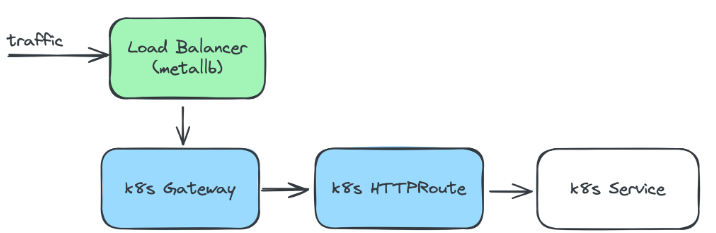
This link bro: https://www.anyflow.net/sw-engineer/replace-ingress-into-gatewayapi
Cilium API test
# Exposing already deployed hubble UI
apiVersion: gateway.networking.k8s.io/v1
kind: Gateway
metadata:
  name: my-gateway
spec:
  gatewayClassName: cilium
  listeners:
  - protocol: HTTP
    hostname: "*.homek8s.cloud"
    port: 80
    name: web-gw
    allowedRoutes:
      namespaces:
        from: All
---
apiVersion: gateway.networking.k8s.io/v1
kind: HTTPRoute
metadata:
  name: http-app-1
  namespace: kube-system
spec:
  hostnames:
  - test.homek8s.cloud
  parentRefs:
  - name: my-gateway
    namespace: default
  rules:
  - matches:
    - path:
        type: PathPrefix
        value: /
    backendRefs:
    - name: hubble-ui
      port: 80
Confirm resources
waji@master:~$ k get gc
NAME     CONTROLLER                     ACCEPTED   AGE
cilium   io.cilium/gateway-controller   True       84m

waji@master:~$ k get gateway
NAME         CLASS    ADDRESS           PROGRAMMED   AGE
my-gateway   cilium   192.168.219.248   True         63m

waji@master:~$ k get svc
NAME                        TYPE           CLUSTER-IP     EXTERNAL-IP       PORT(S)        AGE
cilium-gateway-my-gateway   LoadBalancer   10.104.72.33   192.168.219.248   80:31874/TCP   63m
kubernetes                  ClusterIP      10.96.0.1      <none>            443/TCP        22h
waji@master:~$ k get httproutes -n kube-system
NAME         HOSTNAMES                AGE
http-app-1   ["test.homek8s.cloud"]   63m
In the browser
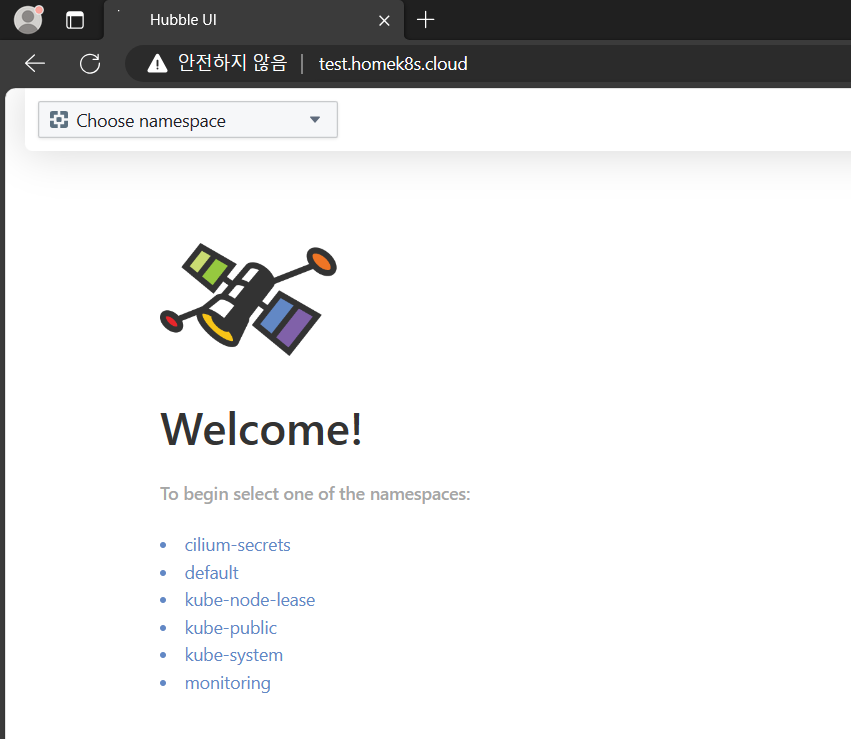
Wildcard TLS on Gateway API
No need to apply each TLS on every httproute. Just need one *.homek8s.cloud TLS from certbot and then wolla~ TLS on every httproute automatically
apiVersion: gateway.networking.k8s.io/v1
kind: Gateway
metadata:
  name: my-gateway
  namespace: kube-system
spec:
  gatewayClassName: cilium
  listeners:
  - protocol: HTTP
    port: 80
    name: web-gw
    allowedRoutes:
      namespaces:
        from: All
  - protocol: HTTPS
    port: 443
    name: web-tls-gw
    tls:
      certificateRefs:
      - kind: Secret
        group: ""
        name: dns-tls         ## ==> got this via certbot (requested as *.homek8s.cloud)
        namespace: kube-system
    allowedRoutes:
      namespaces:
        from: All
Replace Metallb with Cilium
https://isovalent.com/blog/post/migrating-from-metallb-to-cilium/
Use the below for Ip pool and l2 announcement
apiVersion: "cilium.io/v2alpha1"
kind: CiliumLoadBalancerIPPool
metadata:
  name: "pool"
spec:
  blocks:
    - cidr: "192.168.219.248/31"
---
apiVersion: "cilium.io/v2alpha1"
kind: CiliumL2AnnouncementPolicy
metadata:
  name: l2policy
spec:
  loadBalancerIPs: true
Activate following values in Helm chart
kubeProxyReplacement:true

l2announcements:
  enabled:true

externalIPs:
  enabled:true
Bug for when Cilium doesn’t use pod CIDR declared in K8s nodes
https://docs.cilium.io/en/v1.9/concepts/networking/ipam/kubernetes/#configuration
Need to enable the above values in helm values
Prometheus Target Down Error
After installation, kube-controller-manager + kube-scheduler + etcd targets show down as they are listening to localhost of the container instead of the actual master host
## The following line is set as
- --bind-address=127.0.0.1

## Change to
- --bind-address=0.0.0.0


## For etcd.yaml
- --listen-metrics-urls=http://0.0.0.0:2381