Jenkins Setup
After helm installation, there are some additional setups
Install the following Jenkins plugins:
- Docker Plugin (Docker Pipeline Plugin)
- Kubernetes Plugin
- Git Plugin
- Pipeline Plugin
Next setup Jenkins Kubernetes Plugin
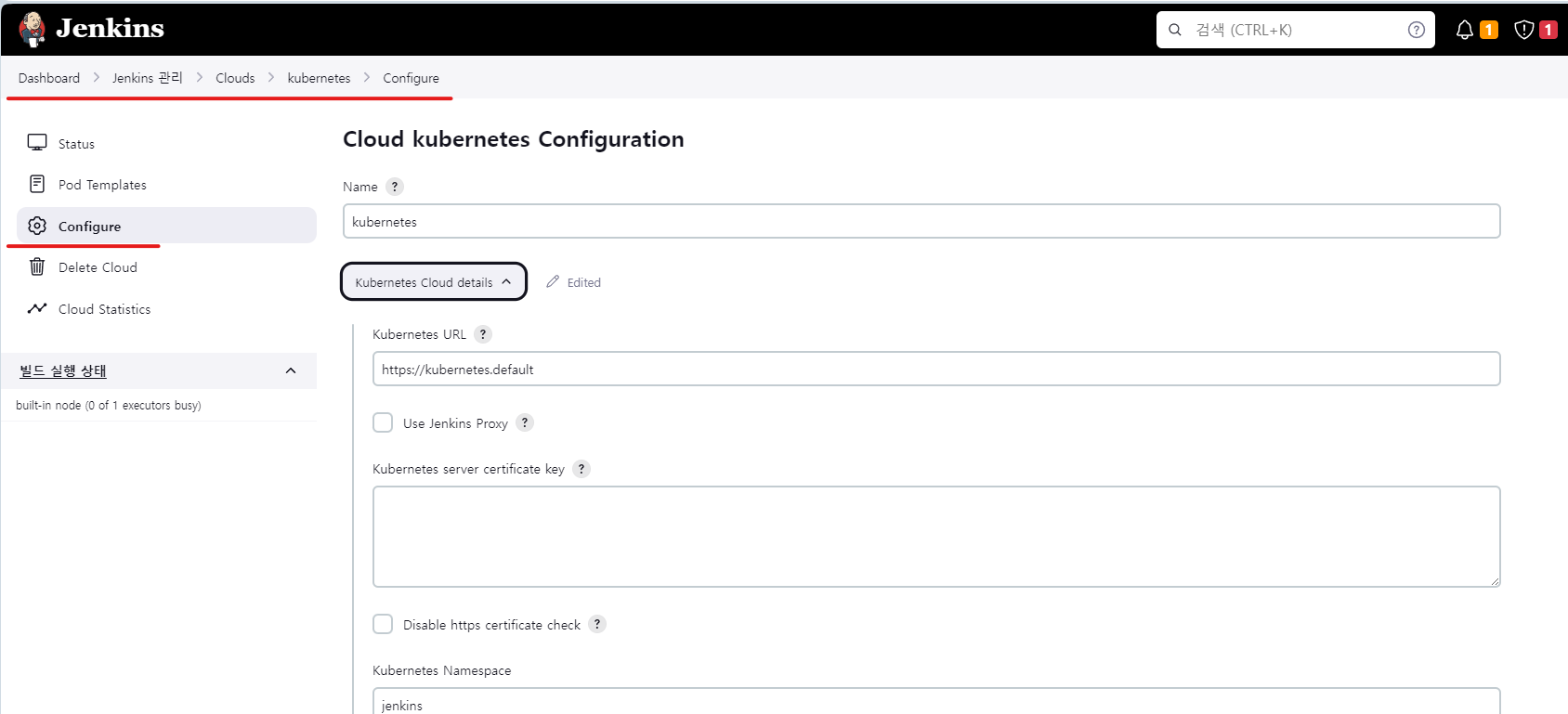
Update the Kubernetes URL info accordingly. Then go to ‘Pod Templates’ settings
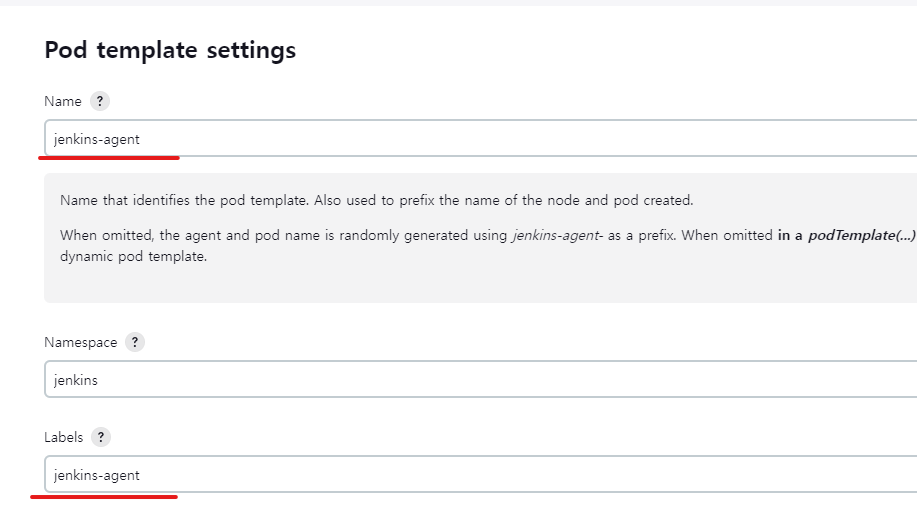
Only changed the name and labels but there are some many customization setups for the Slave pod settings
Okay now we will test a simple test jenkins build to see if the Agent pod comes up once we trigger a job,

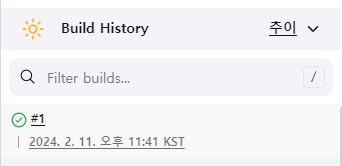
In the CLI, the agent came up and got deleted once the above job was completed successfully
waji@master01:~$ k get po -n jenkins
NAME                  READY   STATUS    RESTARTS   AGE
jenkins-0             2/2     Running   0          38h
jenkins-agent-7sm6p   1/1     Running   0          28s

waji@master01:~$ k get po -n jenkins
NAME                  READY   STATUS        RESTARTS   AGE
jenkins-0             2/2     Running       0          38h
jenkins-agent-7sm6p   1/1     Terminating   0          29s

waji@master01:~$ k get po -n jenkins
NAME        READY   STATUS    RESTARTS   AGE
jenkins-0   2/2     Running   0          38h
Django App Pipeline
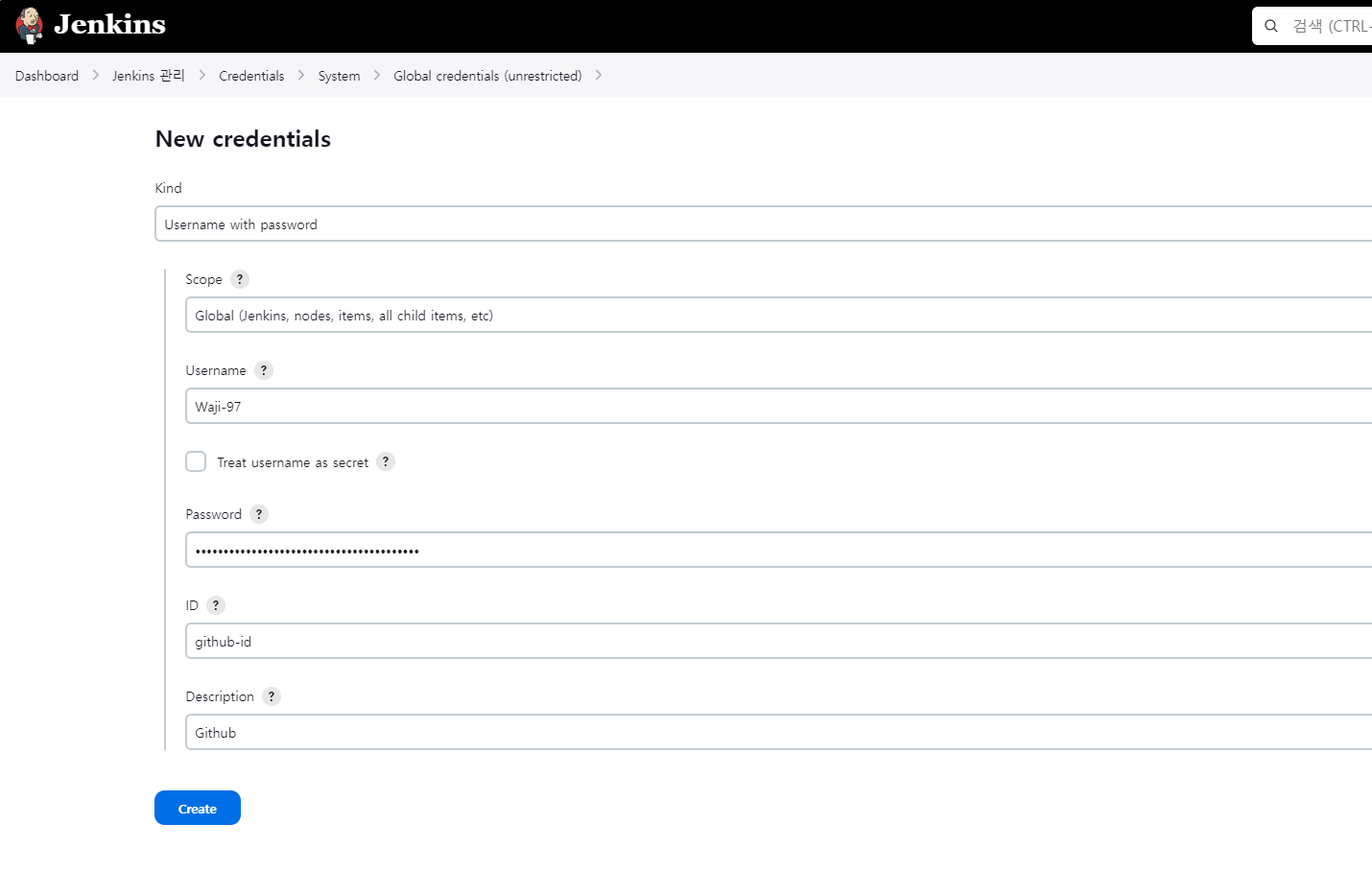
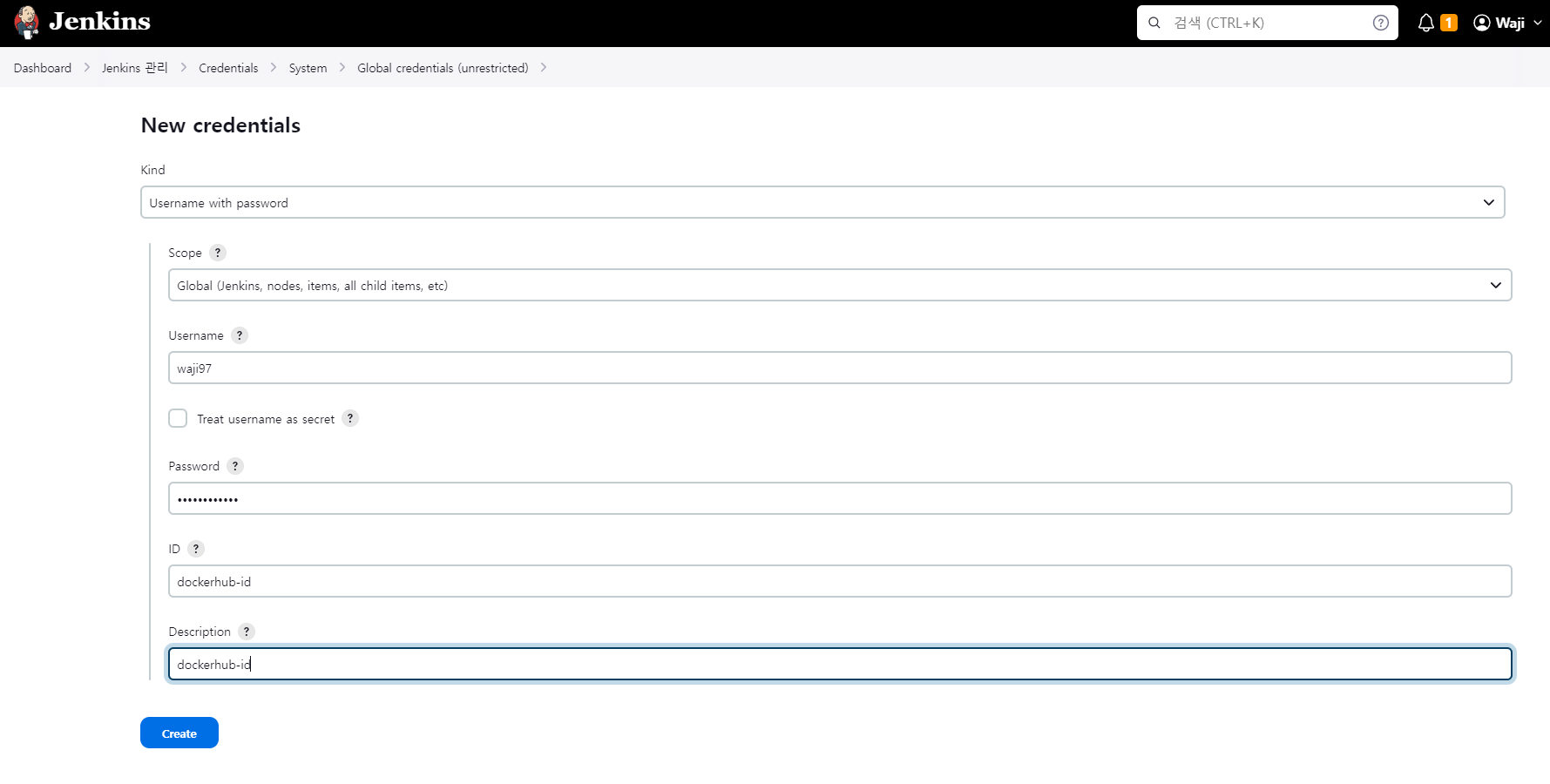
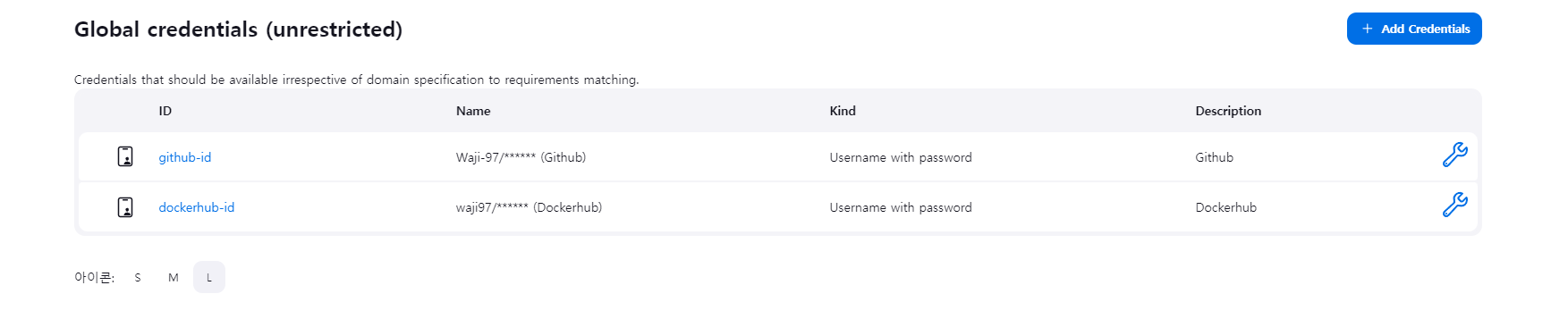
New pipeline in Jenkins
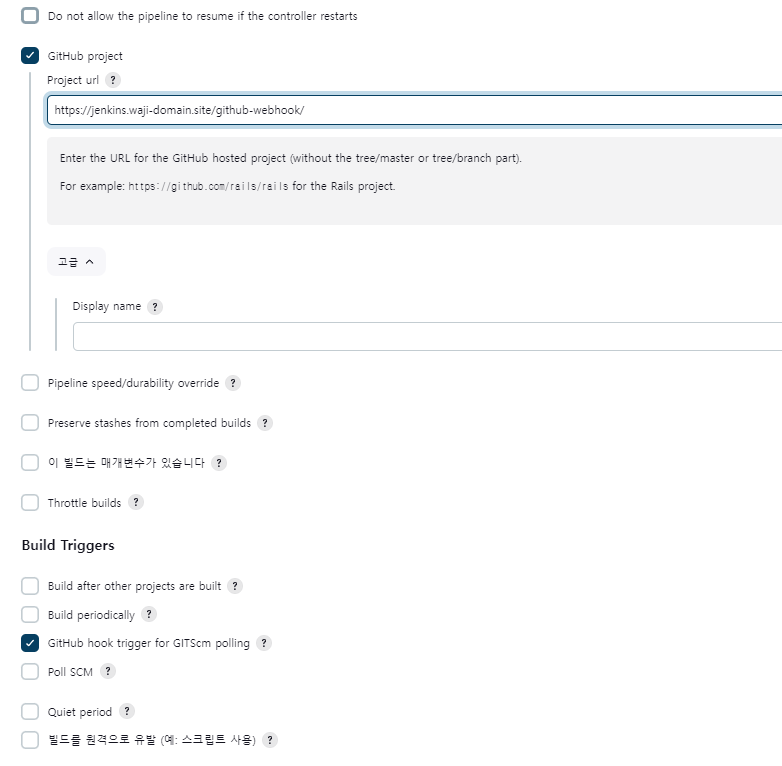
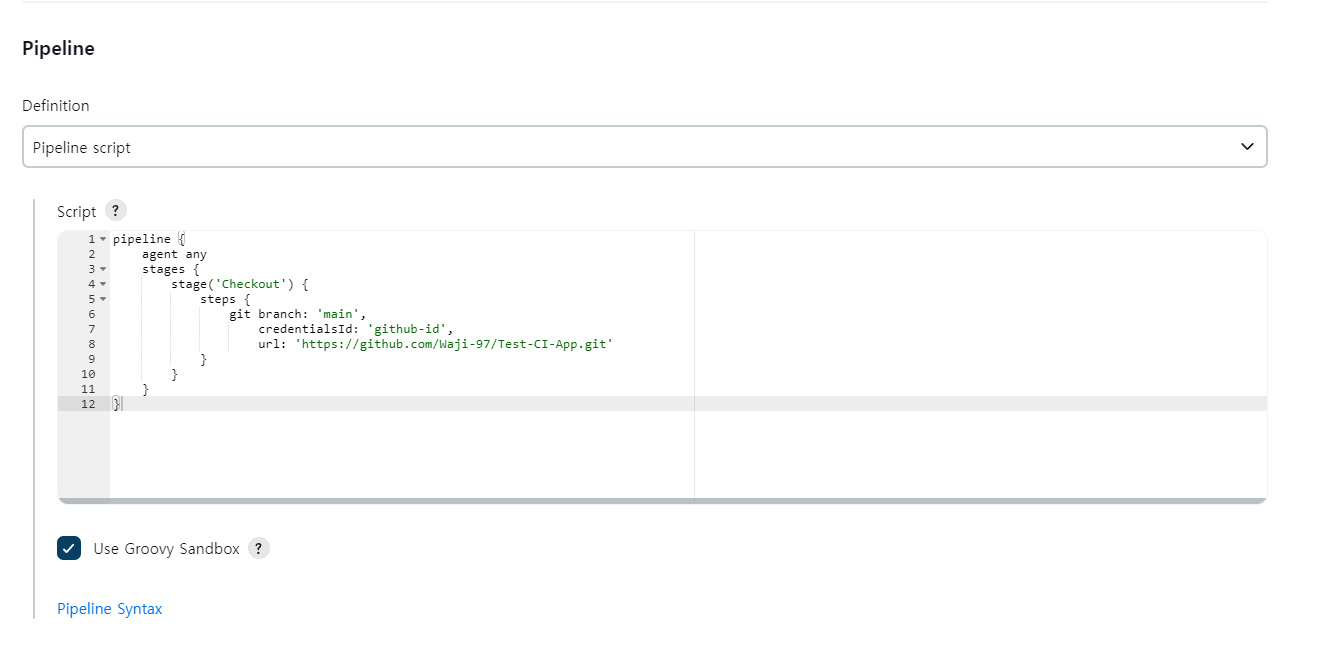
Running Jenkins Test Job
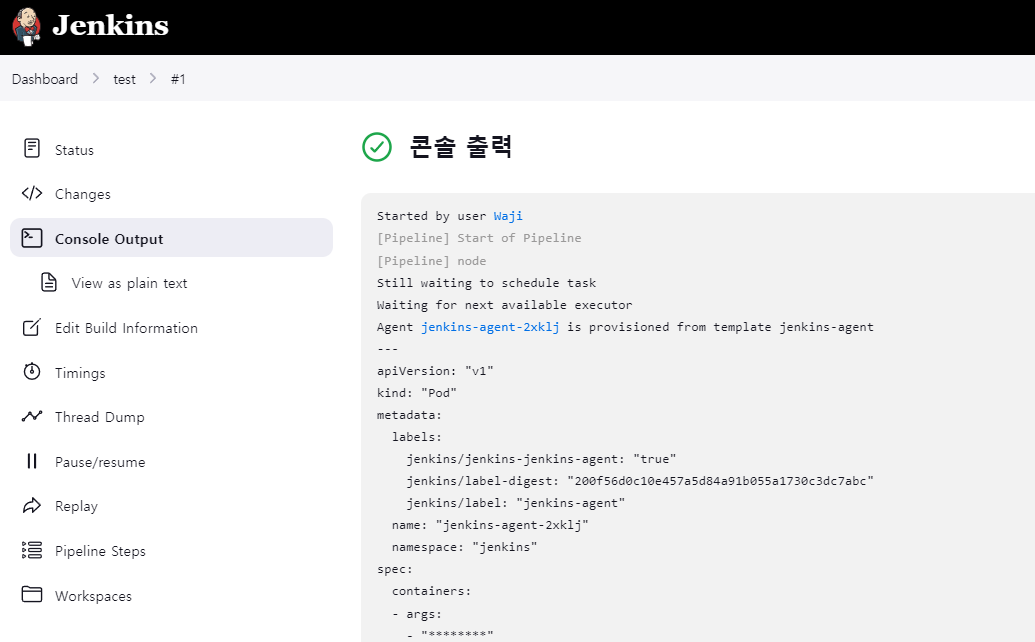
Full logs
Started by user Waji
[Pipeline] Start of Pipeline
[Pipeline] node
Still waiting to schedule task
Waiting for next available executor
Agent jenkins-agent-2xklj is provisioned from template jenkins-agent
---
apiVersion: "v1"
kind: "Pod"
metadata:
  labels:
    jenkins/jenkins-jenkins-agent: "true"
    jenkins/label-digest: "200f56d0c10e457a5d84a91b055a1730c3dc7abc"
    jenkins/label: "jenkins-agent"
  name: "jenkins-agent-2xklj"
  namespace: "jenkins"
spec:
  containers:
  - args:
    - "********"
    - "jenkins-agent-2xklj"
    env:
    - name: "JENKINS_SECRET"
      value: "********"
    - name: "JENKINS_TUNNEL"
      value: "jenkins-agent.jenkins.svc.cluster.local:50000"
    - name: "JENKINS_AGENT_NAME"
      value: "jenkins-agent-2xklj"
    - name: "JENKINS_NAME"
      value: "jenkins-agent-2xklj"
    - name: "JENKINS_AGENT_WORKDIR"
      value: "/home/jenkins/agent"
    - name: "JENKINS_URL"
      value: "http://jenkins.jenkins.svc.cluster.local:8080/"
    image: "jenkins/inbound-agent:3206.vb_15dcf73f6a_9-3"
    imagePullPolicy: "IfNotPresent"
    name: "jnlp"
    resources:
      limits:
        memory: "512Mi"
        cpu: "512m"
      requests:
        memory: "512Mi"
        cpu: "512m"
    tty: false
    volumeMounts:
    - mountPath: "/home/jenkins/agent"
      name: "workspace-volume"
      readOnly: false
    workingDir: "/home/jenkins/agent"
  hostNetwork: false
  nodeSelector:
    kubernetes.io/os: "linux"
  restartPolicy: "Never"
  serviceAccountName: "default"
  volumes:
  - emptyDir:
      medium: ""
    name: "workspace-volume"

Running on jenkins-agent-2xklj in /home/jenkins/agent/workspace/test
[Pipeline] {
[Pipeline] stage
[Pipeline] { (Checkout)
[Pipeline] git
The recommended git tool is: NONE
using credential github-id
Cloning the remote Git repository
Cloning repository https://github.com/Waji-97/Test-CI-App.git
 > git init /home/jenkins/agent/workspace/test # timeout=10
Fetching upstream changes from https://github.com/Waji-97/Test-CI-App.git
 > git --version # timeout=10
 > git --version # 'git version 2.39.2'
using GIT_ASKPASS to set credentials Github
 > git fetch --tags --force --progress -- https://github.com/Waji-97/Test-CI-App.git +refs/heads/*:refs/remotes/origin/* # timeout=10
 > git config remote.origin.url https://github.com/Waji-97/Test-CI-App.git # timeout=10
 > git config --add remote.origin.fetch +refs/heads/*:refs/remotes/origin/* # timeout=10
Avoid second fetch
Checking out Revision 791967ddf9a2066484c45b1d50424f4b4781568c (refs/remotes/origin/main)
 > git rev-parse refs/remotes/origin/main^{commit} # timeout=10
 > git config core.sparsecheckout # timeout=10
 > git checkout -f 791967ddf9a2066484c45b1d50424f4b4781568c # timeout=10
 > git branch -a -v --no-abbrev # timeout=10
 > git checkout -b main 791967ddf9a2066484c45b1d50424f4b4781568c # timeout=10
Commit message: "Update README.md"
First time build. Skipping changelog.
[Pipeline] }
[Pipeline] // stage
[Pipeline] }
[Pipeline] // node
[Pipeline] End of Pipeline
Finished: SUCCESS
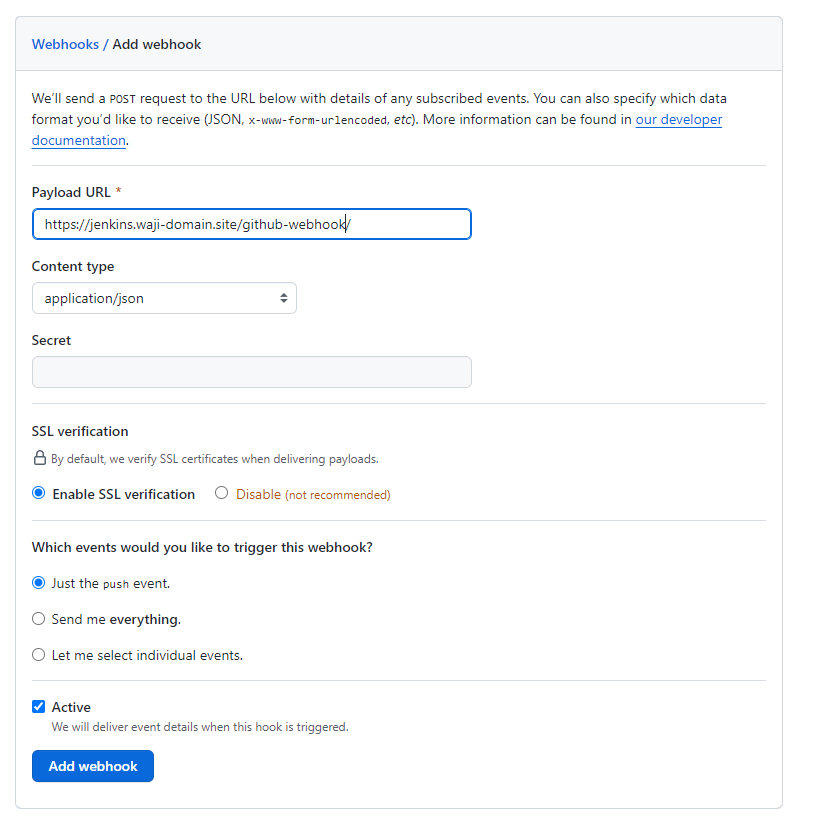
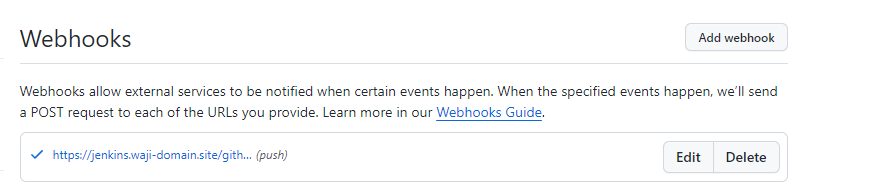
Github Webhook Test:
Edited the README.md file inside the CI test Github Repo, then commited the changes. Now we can see automatic build
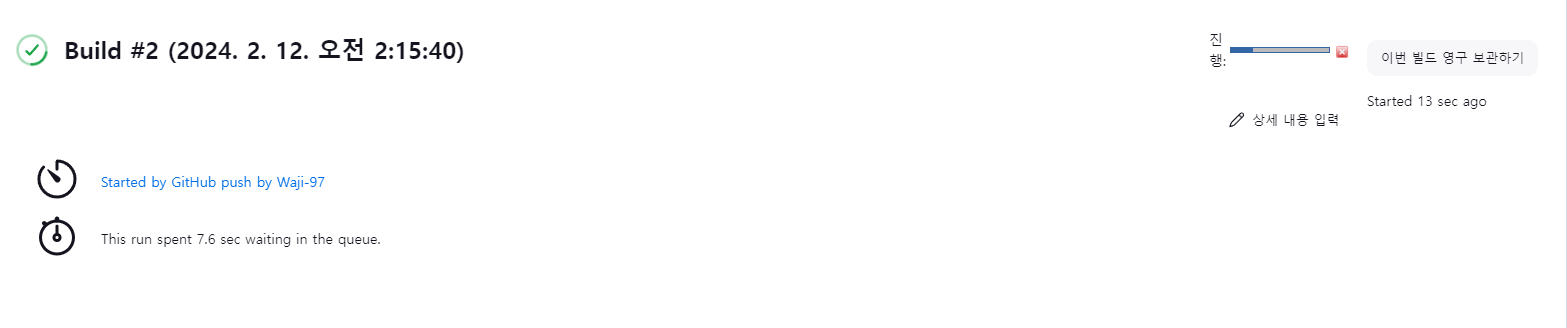
Okay now building the real pipeline for django test application
node("jenkins-agent") {
    stage ('Test') {
        container('jenkins-agent'){
            git branch: 'main', url: 'https://github.com/Waji-97/Test-CI-App.git'
            dir('myproject') {
                sh 'python3 -m venv venv'
                sh '. venv/bin/activate'
                sh 'pip install -r requirements.txt --break-system-packages'
                sh 'python3 manage.py test'
            }
        }
    }

    stage ('Build & Push Docker Image') {
        container('kaniko'){
            git branch: 'main', url: 'https://github.com/Waji-97/Test-CI-App.git'
            script {
                sh '''
                /kaniko/executor --dockerfile `pwd`/myproject/Dockerfile --context `pwd` --destination=waji97/test-ci:${BUILD_NUMBER}
                '''
            }
        }
    }

    stage ('Update IaC') {
        container('jenkins-agent'){
            withCredentials([usernamePassword(credentialsId: 'github-id', usernameVariable: 'USERNAME', passwordVariable: 'PASSWORD')]){
                dir('Test-CD-IaC') {
                git branch: 'main', url: 'https://github.com/Waji-97/Test-CD-IaC.git'
                sh 'git config --global credential.helper "store --file ~/.git-credentials"'
                sh "echo 'https://$USERNAME:$PASSWORD@github.com' > ~/.git-credentials"
                sh 'sed -i "s|image: waji97/test-ci:.*|image: waji97/test-ci:${BUILD_NUMBER}|" deploy.yaml'
                sh 'git config user.email "wajiwos16@gmail.com"'
                sh 'git config user.name "Waji-97"'
                sh 'git add .'
                sh 'git commit -m "Update image tag to ${BUILD_NUMBER}"'
                sh 'git push origin main'
                }
            }
        }
    }
}
Built a custom jenkins container image as the default jenkins agent image doesn’t have python in it.
FROM jenkins/inbound-agent:3206.vb_15dcf73f6a_9-3

USER root

# Install Python and other necessary packages
RUN apt-get update && \
    apt-get install -y python3 python3-pip && \
    rm -rf /var/lib/apt/lists/*

# Set Python 3 as the default Python version
RUN ln -sf /usr/bin/python3 /usr/bin/python && \
    ln -sf /usr/bin/pip3 /usr/bin/pip

USER jenkins
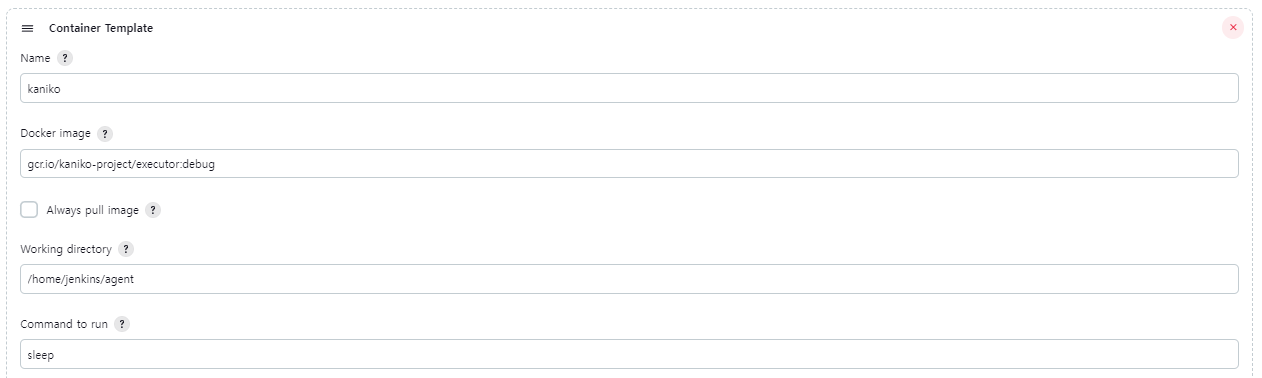
Gonna use Kaniko instead of Docker to build container images (Because K8s doesn’t have docker)
Another container added in Kubernetes Pod Template in Jenkins
Also, need to include a secret volume for kaniko
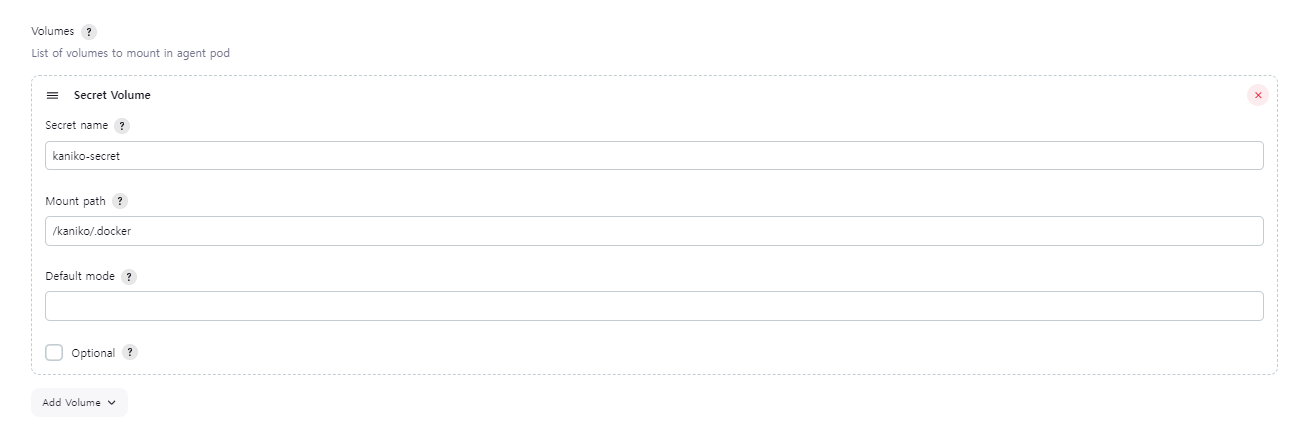
Now we actually need the secret inside the k8s cluster.
## Dockerhub UserID Password encryption
waji@master01:~$ echo -n username:password | base64


## Create a config file
waji@master01:~$ vi config.json
{
        "auths": {
                "https://index.docker.io/v1/": {
                        "auth": "<base64 encoded username:password>"
                }
        }
}


## Create the secret
waji@master01:~$ k create secret generic kaniko-secret --from-file=config.json -n jenkins
secret/kaniko-secret created

waji@master01:~$ k get secret -n jenkins
NAME                            TYPE                 DATA   AGE
jenkins                         Opaque               2      5d2h
jenkins-tls                     kubernetes.io/tls    2      5d2h
kaniko-secret                   Opaque               1      5s
Finally
Started by GitHub push by Waji-97
Obtained Jenkinsfile from githttps://github.com/Waji-97/Test-CI-App.git[Pipeline] Start of Pipeline
[Pipeline] node
Agentjenkins-agent-9vv97 is provisioned from template jenkins-agent
---
apiVersion: "v1"
kind: "Pod"
metadata:
  labels:
    jenkins/jenkins-jenkins-agent: "true"
    jenkins/label-digest: "200f56d0c10e457a5d84a91b055a1730c3dc7abc"
    jenkins/label: "jenkins-agent"
  name: "jenkins-agent-9vv97"
  namespace: "jenkins"
spec:
  containers:
  - args:
    - "********"
    - "jenkins-agent-9vv97"
    env:
    - name: "JENKINS_URL"
      value: "http://jenkins.jenkins.svc.cluster.local:8080/"
    image: "waji97/jenkins-agent:v4"
    imagePullPolicy: "IfNotPresent"
    name: "jenkins-agent"
    resources:
      limits:
        memory: "512Mi"
        cpu: "512m"
      requests:
        memory: "512Mi"
        cpu: "512m"
    tty: false
    volumeMounts:
    - mountPath: "/kaniko/.docker"
      name: "volume-0"
      readOnly: false
    - mountPath: "/home/jenkins/agent"
      name: "workspace-volume"
      readOnly: false
    workingDir: "/home/jenkins/agent"
  - args:
    - "9999999"
    command:
    - "sleep"
    image: "gcr.io/kaniko-project/executor:debug"
    imagePullPolicy: "IfNotPresent"
    name: "kaniko"
    resources: {}
    tty: false
    volumeMounts:
    - mountPath: "/kaniko/.docker"
      name: "volume-0"
      readOnly: false
    - mountPath: "/home/jenkins/agent"
      name: "workspace-volume"
      readOnly: false
    workingDir: "/home/jenkins/agent"
  - env:
    - name: "JENKINS_SECRET"
      value: "********"
    - name: "JENKINS_TUNNEL"
      value: "jenkins-agent.jenkins.svc.cluster.local:50000"
    - name: "JENKINS_AGENT_NAME"
      value: "jenkins-agent-9vv97"
    - name: "JENKINS_NAME"
      value: "jenkins-agent-9vv97"
    - name: "JENKINS_AGENT_WORKDIR"
      value: "/home/jenkins/agent"
    - name: "JENKINS_URL"
      value: "http://jenkins.jenkins.svc.cluster.local:8080/"
    image: "jenkins/inbound-agent:3206.vb_15dcf73f6a_9-2"
    name: "jnlp"
    resources:
      requests:
        memory: "256Mi"
        cpu: "100m"
    volumeMounts:
    - mountPath: "/kaniko/.docker"
      name: "volume-0"
      readOnly: false
    - mountPath: "/home/jenkins/agent"
      name: "workspace-volume"
      readOnly: false
  hostNetwork: false
  nodeSelector:
    kubernetes.io/os: "linux"
  restartPolicy: "Never"
  serviceAccountName: "default"
  volumes:
  - name: "volume-0"
    secret:
      optional: false
      secretName: "kaniko-secret"
  - emptyDir:
      medium: ""
    name: "workspace-volume"

Running onjenkins-agent-9vv97 in /home/jenkins/agent/workspace/Test-CI-App
[Pipeline] {
[Pipeline] stage
[Pipeline] { (Test)
[Pipeline] container
[Pipeline] {
[Pipeline] git
Selected Git installation does not exist. Using Default
The recommended git tool is: NONE
No credentials specified
Warning: JENKINS-30600: special launcher org.csanchez.jenkins.plugins.kubernetes.pipeline.ContainerExecDecorator$1@18e6c751; decorates RemoteLauncher[hudson.remoting.Channel@6b94f64:JNLP4-connect connection from 10.233.64.66/10.233.64.66:42800] will be ignored (a typical symptom is the Git executable not being run inside a designated container)
Cloning the remote Git repository
Cloning repositoryhttps://github.com/Waji-97/Test-CI-App.git
 > git init /home/jenkins/agent/workspace/Test-CI-App # timeout=10
Fetching upstream changes fromhttps://github.com/Waji-97/Test-CI-App.git
 > git --version # timeout=10
 > git --version # 'git version 2.39.2'
 > git fetch --tags --force --progress --https://github.com/Waji-97/Test-CI-App.git +refs/heads/*:refs/remotes/origin/* # timeout=10
Avoid second fetch
 > git config remote.origin.urlhttps://github.com/Waji-97/Test-CI-App.git # timeout=10
 > git config --add remote.origin.fetch +refs/heads/*:refs/remotes/origin/* # timeout=10
 > git rev-parse refs/remotes/origin/main^{commit} # timeout=10
Checking out Revision 2ac6e3ef98562d7840b266406c73396002c296ea (refs/remotes/origin/main)
Commit message: "Update Jenkinsfile"
 > git config core.sparsecheckout # timeout=10
 > git checkout -f 2ac6e3ef98562d7840b266406c73396002c296ea # timeout=10
 > git branch -a -v --no-abbrev # timeout=10
 > git checkout -b main 2ac6e3ef98562d7840b266406c73396002c296ea # timeout=10
 > git rev-list --no-walk 37ecf8cc8776a14b23da19538f4fdd8fb317c5af # timeout=10
[Pipeline] dir
Running in /home/jenkins/agent/workspace/Test-CI-App/myproject
[Pipeline] {
[Pipeline] sh
+ python3 -m venv venv

[Pipeline] sh
+ . venv/bin/activate
+ deactivate nondestructive
+ [ -n  ]
+ [ -n  ]
+ [ -n  -o -n  ]
+ [ -n  ]
+ unset VIRTUAL_ENV
+ unset VIRTUAL_ENV_PROMPT
+ [ ! nondestructive = nondestructive ]
+ VIRTUAL_ENV=/home/jenkins/agent/workspace/Test-CI-App/myproject/venv
+ export VIRTUAL_ENV
+ _OLD_VIRTUAL_PATH=/opt/java/openjdk/bin:/usr/local/sbin:/usr/local/bin:/usr/sbin:/usr/bin:/sbin:/bin
+ PATH=/home/jenkins/agent/workspace/Test-CI-App/myproject/venv/bin:/opt/java/openjdk/bin:/usr/local/sbin:/usr/local/bin:/usr/sbin:/usr/bin:/sbin:/bin
+ export PATH
+ [ -n  ]
+ [ -z  ]
+ _OLD_VIRTUAL_PS1=$
+ PS1=(venv) $
+ export PS1
+ VIRTUAL_ENV_PROMPT=(venv)
+ export VIRTUAL_ENV_PROMPT
+ [ -n  -o -n  ]
[Pipeline] sh
+ pip install -r requirements.txt --break-system-packages
Defaulting to user installation because normal site-packages is not writeable

Collecting Django==5.0.2
  Downloading Django-5.0.2-py3-none-any.whl (8.2 MB)
     ━━━━━━━━━━━━━━━━━━━━━━━━━━━━━━━━━━━━━━━━ 8.2/8.2 MB 18.6 MB/s eta 0:00:00
Collecting asgiref<4,>=3.7.0
  Downloading asgiref-3.7.2-py3-none-any.whl (24 kB)

Collecting sqlparse>=0.3.1
  Downloading sqlparse-0.4.4-py3-none-any.whl (41 kB)
     ━━━━━━━━━━━━━━━━━━━━━━━━━━━━━━━━━━━━━━━━ 41.2/41.2 kB 5.2 MB/s eta 0:00:00
Installing collected packages: sqlparse, asgiref, Django
  WARNING: The script sqlformat is installed in '/home/jenkins/.local/bin' which is not on PATH.
  Consider adding this directory to PATH or, if you prefer to suppress this warning, use --no-warn-script-location.

  WARNING: The script django-admin is installed in '/home/jenkins/.local/bin' which is not on PATH.
  Consider adding this directory to PATH or, if you prefer to suppress this warning, use --no-warn-script-location.
Successfully installed Django-5.0.2 asgiref-3.7.2 sqlparse-0.4.4
[Pipeline] sh
+ python3 manage.py test
Found 0 test(s).
System check identified no issues (0 silenced).

----------------------------------------------------------------------
Ran 0 tests in 0.000s

OK
[Pipeline] }
[Pipeline] // dir
[Pipeline] }
[Pipeline] // container
[Pipeline] }
[Pipeline] // stage

[Pipeline] stage
[Pipeline] { (Build & Push Docker Image)
[Pipeline] container
[Pipeline] {
[Pipeline] git
Selected Git installation does not exist. Using Default
The recommended git tool is: NONE
No credentials specified
Warning: JENKINS-30600: special launcher org.csanchez.jenkins.plugins.kubernetes.pipeline.ContainerExecDecorator$1@1e2ca93b; decorates RemoteLauncher[hudson.remoting.Channel@6b94f64:JNLP4-connect connection from 10.233.64.66/10.233.64.66:42800] will be ignored (a typical symptom is the Git executable not being run inside a designated container)
Fetching changes from the remote Git repository
Checking out Revision 2ac6e3ef98562d7840b266406c73396002c296ea (refs/remotes/origin/main)
Commit message: "Update Jenkinsfile"
[Pipeline] script
[Pipeline] {
[Pipeline] sh
 > git rev-parse --resolve-git-dir /home/jenkins/agent/workspace/Test-CI-App/.git # timeout=10
 > git config remote.origin.urlhttps://github.com/Waji-97/Test-CI-App.git # timeout=10
Fetching upstream changes fromhttps://github.com/Waji-97/Test-CI-App.git
 > git --version # timeout=10
 > git --version # 'git version 2.39.2'
 > git fetch --tags --force --progress --https://github.com/Waji-97/Test-CI-App.git +refs/heads/*:refs/remotes/origin/* # timeout=10
 > git rev-parse refs/remotes/origin/main^{commit} # timeout=10
 > git config core.sparsecheckout # timeout=10
 > git checkout -f 2ac6e3ef98562d7840b266406c73396002c296ea # timeout=10
 > git branch -a -v --no-abbrev # timeout=10
 > git branch -D main # timeout=10
 > git checkout -b main 2ac6e3ef98562d7840b266406c73396002c296ea # timeout=10
+ pwd
+ pwd
+ /kaniko/executor --dockerfile /home/jenkins/agent/workspace/Test-CI-App/myproject/Dockerfile --context /home/jenkins/agent/workspace/Test-CI-App '--destination=waji97/test-ci:53'

[36mINFO[0m[0001] Retrieving image manifest python:3.12.1-slim
[36mINFO[0m[0001] Retrieving image python:3.12.1-slim from registry index.docker.io

[36mINFO[0m[0003] Built cross stage deps: map[]
[36mINFO[0m[0003] Retrieving image manifest python:3.12.1-slim
[36mINFO[0m[0003] Returning cached image manifest
[36mINFO[0m[0003] Executing 0 build triggers
[36mINFO[0m[0003] Building stage 'python:3.12.1-slim' [idx: '0', base-idx: '-1']
[36mINFO[0m[0003] Unpacking rootfs as cmd COPY myproject/requirements.txt /app/ requires it.

[36mINFO[0m[0008] ENV PYTHONDONTWRITEBYTECODE 1
[36mINFO[0m[0008] ENV PYTHONUNBUFFERED 1
[36mINFO[0m[0008] WORKDIR /app
[36mINFO[0m[0008] Cmd: workdir
[36mINFO[0m[0008] Changed working directory to /app
[36mINFO[0m[0008] Creating directory /app with uid -1 and gid -1
[36mINFO[0m[0008] Taking snapshot of files...
[36mINFO[0m[0008] COPY myproject/requirements.txt /app/
[36mINFO[0m[0008] Taking snapshot of files...
[36mINFO[0m[0008] RUN pip install --upgrade pip && pip install -r requirements.txt
[36mINFO[0m[0008] Initializing snapshotter ...
[36mINFO[0m[0008] Taking snapshot of full filesystem...
[36mINFO[0m[0010] Cmd: /bin/sh
[36mINFO[0m[0010] Args: [-c pip install --upgrade pip && pip install -r requirements.txt]
[36mINFO[0m[0010] Running: [/bin/sh -c pip install --upgrade pip && pip install -r requirements.txt]

Requirement already satisfied: pip in /usr/local/lib/python3.12/site-packages (23.2.1)
Collecting pip
  Obtaining dependency information for pip fromhttps://files.pythonhosted.org/packages/8a/6a/19e9fe04fca059ccf770861c7d5721ab4c2aebc539889e97c7977528a53b/pip-24.0-py3-none-any.whl.metadata
  Downloading pip-24.0-py3-none-any.whl.metadata (3.6 kB)
Downloading pip-24.0-py3-none-any.whl (2.1 MB)
   ━━━━━━━━━━━━━━━━━━━━━━━━━━━━━━━━━━━━━━━━ 2.1/2.1 MB 11.2 MB/s eta 0:00:00
Installing collected packages: pip
  Attempting uninstall: pip
    Found existing installation: pip 23.2.1
    Uninstalling pip-23.2.1:
      Successfully uninstalled pip-23.2.1

Successfully installed pip-24.0
WARNING: Running pip as the 'root' user can result in broken permissions and conflicting behaviour with the system package manager. It is recommended to use a virtual environment instead:https://pip.pypa.io/warnings/venv
Collecting Django==5.0.2 (from -r requirements.txt (line 1))
  Downloading Django-5.0.2-py3-none-any.whl.metadata (4.1 kB)

Collecting asgiref<4,>=3.7.0 (from Django==5.0.2->-r requirements.txt (line 1))
  Downloading asgiref-3.7.2-py3-none-any.whl.metadata (9.2 kB)
Collecting sqlparse>=0.3.1 (from Django==5.0.2->-r requirements.txt (line 1))
  Downloading sqlparse-0.4.4-py3-none-any.whl (41 kB)
     ━━━━━━━━━━━━━━━━━━━━━━━━━━━━━━━━━━━━━━━━ 41.2/41.2 kB 2.4 MB/s eta 0:00:00
Downloading Django-5.0.2-py3-none-any.whl (8.2 MB)
   ━━━━━━━━━━━━━━━━━━━━━━━━━━━━━━━━━━━━━━━━ 8.2/8.2 MB 39.7 MB/s eta 0:00:00
Downloading asgiref-3.7.2-py3-none-any.whl (24 kB)
Installing collected packages: sqlparse, asgiref, Django

Successfully installed Django-5.0.2 asgiref-3.7.2 sqlparse-0.4.4
WARNING: Running pip as the 'root' user can result in broken permissions and conflicting behaviour with the system package manager. It is recommended to use a virtual environment instead:https://pip.pypa.io/warnings/venv
[36mINFO[0m[0024] Taking snapshot of full filesystem...

[36mINFO[0m[0029] COPY myproject /app/
[36mINFO[0m[0030] Taking snapshot of files...

[36mINFO[0m[0031] EXPOSE 8000
[36mINFO[0m[0031] Cmd: EXPOSE
[36mINFO[0m[0031] Adding exposed port: 8000/tcp
[36mINFO[0m[0031] CMD ["python", "manage.py", "runserver", "0.0.0.0:8000"]
[36mINFO[0m[0031] Pushing image to waji97/test-ci:53

[36mINFO[0m[0043] Pushed index.docker.io/waji97/test-ci@sha256:e7f68d118da993db0df398063f6a120442e8406750dad7811f1d4f8b311875bc
[Pipeline] }
[Pipeline] // script
[Pipeline] }
[Pipeline] // container
[Pipeline] }
[Pipeline] // stage
[Pipeline] stage
[Pipeline] { (Update IaC)
[Pipeline] container
[Pipeline] {
[Pipeline] withCredentials
Masking supported pattern matches of $PASSWORD
[Pipeline] {
[Pipeline] dir
Running in /home/jenkins/agent/workspace/Test-CI-App/Test-CD-IaC
[Pipeline] {
[Pipeline] git
The recommended git tool is: NONE

No credentials specified
Warning: JENKINS-30600: special launcher org.csanchez.jenkins.plugins.kubernetes.pipeline.ContainerExecDecorator$1@6cf42b4b; decorates RemoteLauncher[hudson.remoting.Channel@6b94f64:JNLP4-connect connection from 10.233.64.66/10.233.64.66:42800] will be ignored (a typical symptom is the Git executable not being run inside a designated container)
Cloning the remote Git repository
Cloning repositoryhttps://github.com/Waji-97/Test-CD-IaC.git
 > git init /home/jenkins/agent/workspace/Test-CI-App/Test-CD-IaC # timeout=10
Fetching upstream changes fromhttps://github.com/Waji-97/Test-CD-IaC.git
 > git --version # timeout=10
 > git --version # 'git version 2.39.2'
 > git fetch --tags --force --progress --https://github.com/Waji-97/Test-CD-IaC.git +refs/heads/*:refs/remotes/origin/* # timeout=10
Avoid second fetch
Checking out Revision 38a7c9756f1143053b55dcb771fb383b28bae34e (refs/remotes/origin/main)
 > git config remote.origin.urlhttps://github.com/Waji-97/Test-CD-IaC.git # timeout=10
 > git config --add remote.origin.fetch +refs/heads/*:refs/remotes/origin/* # timeout=10
 > git rev-parse refs/remotes/origin/main^{commit} # timeout=10
 > git config core.sparsecheckout # timeout=10
 > git checkout -f 38a7c9756f1143053b55dcb771fb383b28bae34e # timeout=10
 > git branch -a -v --no-abbrev # timeout=10
 > git checkout -b main 38a7c9756f1143053b55dcb771fb383b28bae34e # timeout=10

Commit message: "Update deploy.yaml"
 > git rev-list --no-walk 38a7c9756f1143053b55dcb771fb383b28bae34e # timeout=10
[Pipeline] sh
+ git config --global credential.helper store --file ~/.git-credentials
[Pipeline] sh
Warning: A secret was passed to "sh" using Groovy String interpolation, which is insecure.
		 Affected argument(s) used the following variable(s): [PASSWORD]
		 Seehttps://jenkins.io/redirect/groovy-string-interpolation for details.

+ echohttps://Waji-97:****@github.com[Pipeline] sh
+ sed -i s|image: waji97/test-ci:.*|image: waji97/test-ci:53| deploy.yaml
[Pipeline] sh
+ git config user.email wajiwos16@gmail.com
[Pipeline] sh
+ git config user.name Waji-97
[Pipeline] sh
+ git add .
[Pipeline] sh
+ git commit -m Update image tag to 53
[main 5ed6562] Update image tag to 53
 1 file changed, 1 insertion(+), 1 deletion(-)
[Pipeline] sh
+ git push origin main
Tohttps://github.com/Waji-97/Test-CD-IaC.git
   38a7c97..5ed6562  main -> main
[Pipeline] }

[Pipeline] // dir
[Pipeline] }
[Pipeline] // withCredentials
[Pipeline] }
[Pipeline] // container
[Pipeline] }
[Pipeline] // stage
[Pipeline] }
[Pipeline] // node
[Pipeline] End of Pipeline
Finished: SUCCESS
Using declarative pipeline