Ansible Notes
환경설정, 배포를 가능하게 하는 언어이며, 리모트 서버에 접속해서 무언가를 시행시키는 정책을 만들어 실행한다. 정책은 yaml 문법으로 설정 한다.
ansible 장점
멱등성이란?
선언형 언어란?
Jinja2 란?
Python에서 가장 많이 사용하는 template 엔진이다.
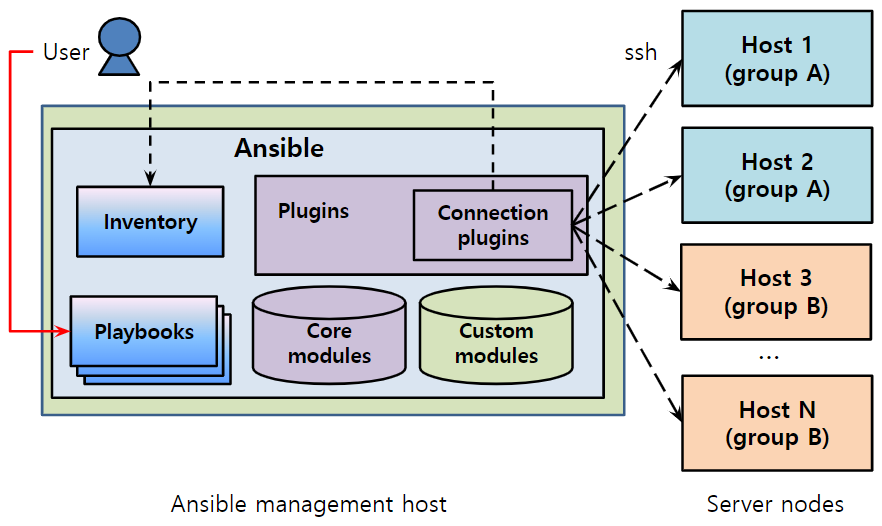
Ansible 구조
Inventory 란
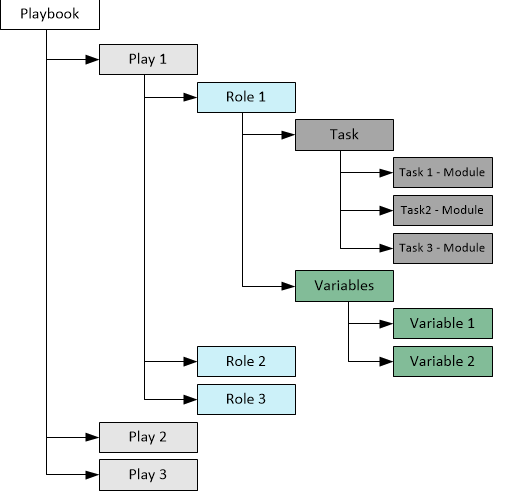
Playbook 이란
ansible module 이란 python의 pip 처럼 ansible tasks 를 수행 할때 도움을 주는 plugin 이다. 예를 들어 linux에서 ansible로 파일을 만드는 방법은 대표적으로 2가지가 있다. ex) shell, file
--- ## shell moduel
- name: Ansible Module Test1
  gather_facts: no
  hosts: test
  tasks:
   - name: shell Module
     shell: touch /home/node/Test_Module.txt && chown app:app /home/node/Test_Module.txt && chmod 644 /home/node/Test_Module.txt

--- ## file module
- name: Ansible Module Test2
  gather_facts: no
  hosts: test
  tasks:
   - name: File Module
     file:
      path: /home/node/Test_Module.txt
      state: file
      owner: app
      group: app
      mode: 0644
Plugin 과 차이점
module 설치 방법
기본적으로 ansible core 를 설치하면 default module은 설치되며 python으로만 모듈을 제공하기 때문에 pip 를 설치해도 사용 가능하다.
ex) kubernetes.core.k8s module
ansible-galaxy collection install kubernetes.core
or
pip install kubernetes
Ansible의 role(롤)은 Playbook(플레이북)을 여러 파일로 분할하는 메커니즘이다.
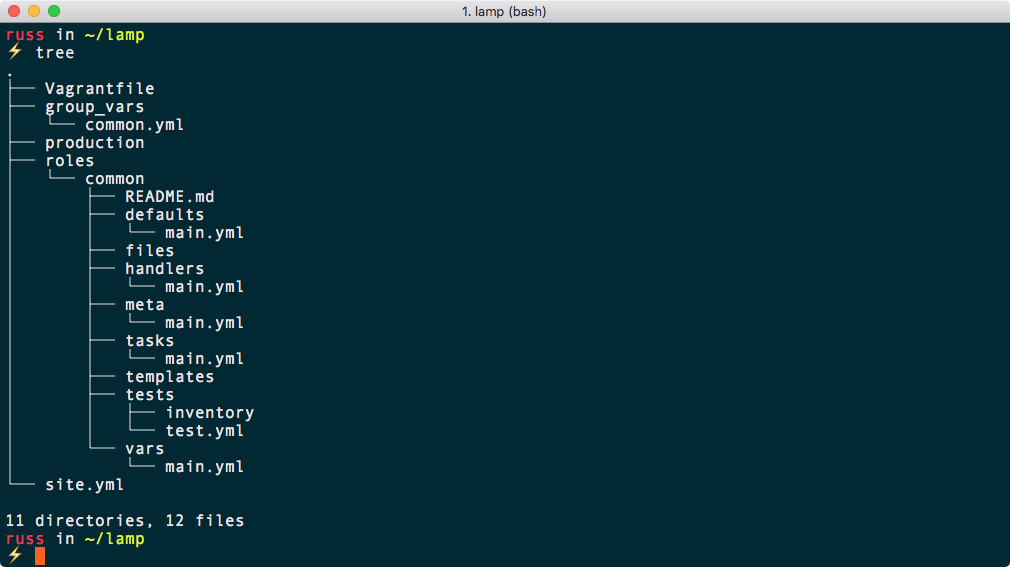
ansible role 구성 시 directory 구조
Example Code for Ansible
Parsing module
# 1. lineinfile
- name: Test Delete Marker Line
  lineinfile:
     dest: "/tmp/test.txt"
     regexp: '#'
     state: absent
  register: result
  until: result is succeeded

# /tmp/test.txt file에서 '#' 문구가 들어가있는 라인들은 전부 삭제 하고,
# 결과를 result라는 변수에 저장 후 조건이 충족될때까지 loop

# 2. blockinfile
- name: Test Insert Marker Line
  blockinfile:
     path: "/tmp/test.txt"
     marker: '# Ansible Marker'
     block:>
       test1
       test2: ok
     state: present
  register: result
  until: result is succeeded

# /tmp/test.txt 에서 #ansibkle maker 마커를 남기고 block 밑에있는 문구를 insert 한다.

# 3. replcae
- name: replace test
  replace:
    path: '/tmp/test.txt'
    regexp: '\r'
    replace: ''

# /tmp/test.txt 에서 ₩r 문자를 빈공간으로 대채한다.


# 4. vars parsing
# ansible에서는 vars값을 받아와 split 할수도 있고 regex를 사용하여 condition을 사용 할 수 있다.
- name: test split
  set_fact:
    file_content: "{{ file_content_line.split('\n') }}"
- debug:
    msg: "{{ file_content }}"

# file_content_line 변수를 줄띄우기 부분을 제거하여 file_content 변수에 넣기

- name: test regex, when condition
  set_fact:
    content_set "{{ content_set | default([]) + [item] }}"
  loop: "{{ content_line }}"
  when: item | regex_search '\w*test(aa|bb|cc)\w*d+')

# content_line 에 설정된 변수만큼 루프를 돌면서 content_set 변수에 list 형태로 변수를 선언
# 이때 content_set은 content line에서 처음에 아무문자가 오고 중간에 test가 있으며
# test 뒤에는 aa또는 bb 또는 cc가 있고 그 뒤에는 아무 문자가 오며 마지막에 숫자로 끝나야 변수 선언
template
- name: test template
  blockinfile:
    path: "/tmp/test.txt"
    block: "{{ lookup('template', 'test.j2') }}"
    state: present

# role 구조에서 test.j2라는 jinja2 template내용을 /tmp/test.txt에 기입하겠다.
# test.j2
register: test.com
files_repo: "{{ test_repo }}"
{% raw %}
kube_image_repo: "{{ registry_host }}"
{% endraw %}
{% if test_vars is defined %}
test: "{{ test2_vars }}"
{% endif %}
{% for item in test_name %}
{{ item }} is ok
ansible_hosts={{ test_ip[loop.index0] }}
{% endfor %}

# 위와 같은 형태로 템플릿을 만들 때 raw는 endraw 까지 템플릿에 있는 문자 그대로를 사용
# if 문을 사용하여 condition 사용 가능
# for문을 사용하여 loop 사용 가능
# test_ip[loop.index0] 의미는 test_ip가 list 형태 일때 순서대로 값을 불러오는 것

# jinja2 문법이라 jinja2 문법으로 기입해야한다.
Kubernetes
- name: Create cluster role
  k8s:
    staste: present
    definition:
      apiVersion: rbac.authorization.k8s.io/v1
      kind: ClusterRole
      metadata:
        name: test-role
      rules:
        - apiGroups: ["*"]
          resources: ["*"]
          verbs: ["*"]
        - nonResourceURLs: ["*"]
          verbs: ["*"]
openssh_keypair
- name: Generate ssh key fair test
  openssh_keypair:
    path: /home/test/.ssh/id_rsa
    force: no
    type: rsa
    onwer: test
    group: test
Copy
- name: Get File test (remote)
  slurp:
    src: /home/test/.ssh/id_rsa.pub

# slurp 는 원격에서 host server로 file을 가져올때 사용 함.
# 이때 파일의 내용을 vars로 넣을 수 있는데 slurp 특성상 base64 로 인코딩 되있기 때문에 보려면 디코딩 해야함.

- name: copy test
  copy:
    src: "/tmp/test1"
    dest: "/tmp/test2"
    owner: test
    group: test
    mode: 0644

# copy 모듈은 hosts에서 remote server로 file copy 할수 있고, 실행 시 localhost면
# localhost에 dest로 file 복사 됨.
다른 hosts 및 tasks에서 선언한 동적 변수를 다른 tasks에 넘기고 싶을 때
# inventroy
test:
  ip1_test 10.x.x.x
  ip2_test 10.x.x.x
  ip3_test 10.x.x.x

- name: Find vars test
  hosts: "{{ groups['test'][0] }}"
  gather_facts: false
  tasks:
    - name: find cert file
      find:
        paths: "/etc/ssl/etcd/ssl"
        file_type: file
        use_regex: yes
        patterns:
        - '(?=node.*ket.pem)'
      become: yes
      register: cert_path

    - name: set fact1
      set_fact:
         cert_path_1: "{{ cert_path.files[0].path }}"

- name: othere hosts vars connection
  hosts: localhost
  gather_facts: false
  vars:
    cert_path: "{{ hostvars[groups['test'][0]]['cert_path_1'] }}
  tasks:
     - debug:
         msg: "{{ cert_path }}"
role play에서 inventory file 안에 있는 특정 group 만 호출 하고 싶을때
# role main playbook
- name: test tasks in test1 test2
  hosts: test1, test2
  roles:
    - { role: bastion_job, become: yes }

# role play main.yaml
- name: test1 tasks
  import_tasks: set_test1.yaml
  when "'test1' in group_names"

- name: test2 tasks
  import_tasks: set_test2.yaml
  when "'test2' in group_names"

# bastion job role에서 test1 play는 test1 group들만 실행하고
# test2 play는 test2 group들만 실행된다.
참조:
https://palyoung.tistory.com/24
https://watch-n-learn.tistory.com/92
https://sunrise-min.tistory.com/entry/Ansible
https://docs.ansible.com/ansible/2.9/modules/list_of_all_modules.html
https://docs.ansible.com/ansible/latest/dev_guide/developing_locally.html
https://only-won.tistory.com/13
https://iborymagic.tistory.com/73
https://velog.io/@chl4651/Ansible이란
https://chanchan-father.tistory.com/517#google_vignette