Add EC2 to Mini PC
Add EC2 to my homelabl mini pc as worker nodes
First create EC2
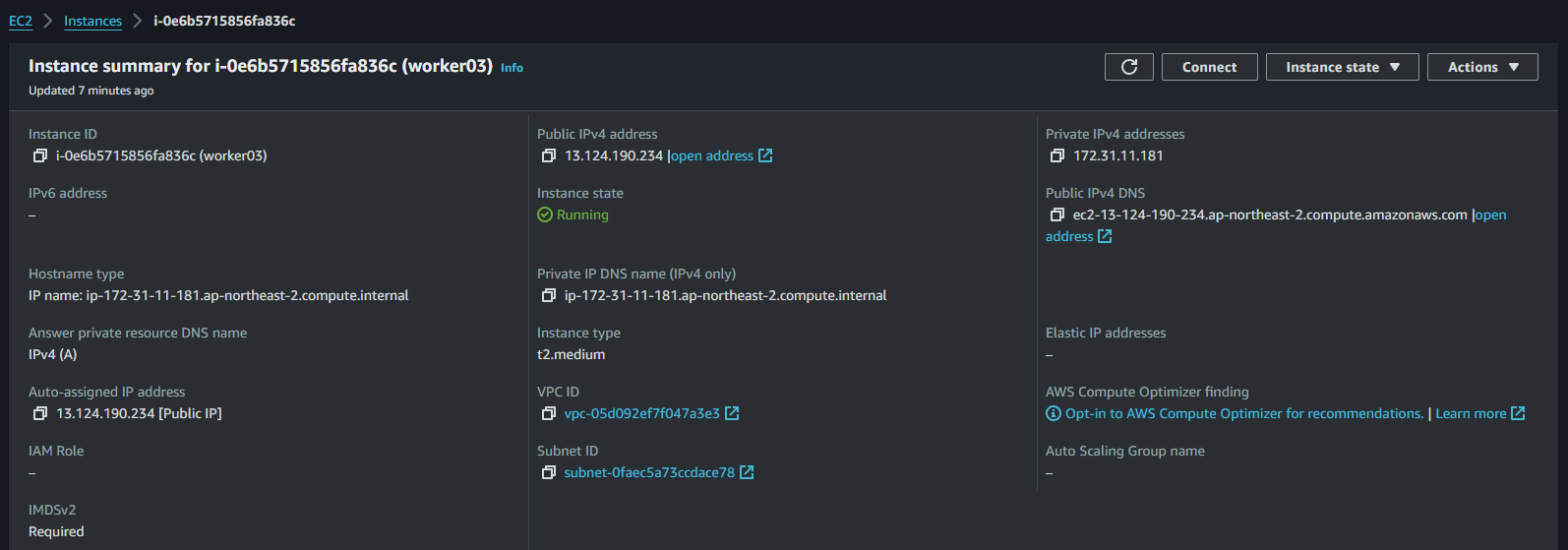
Then connect via EC2 console to add ‘waji’ user
## First change to root
ubuntu@worker03:~$ sudo su - root
root@worker03:~# adduser waji
root@worker03:~# id waji
uid=1001(waji) gid=1001(waji) groups=1001(waji)

## Add to sudo group
root@worker03:~# usermod -aG sudo waji
root@worker03:~# id waji
uid=1001(waji) gid=1001(waji) groups=1001(waji),27(sudo)

## add no passwd to visudo
root@worker03:~# visudo
# Allow members of group sudo to execute any command
%sudo   ALL=(ALL:ALL) NOPASSWD:ALL

## Go to waji user & create .ssh directory + authorized Keys file
root@worker03:~# su - waji
waji@worker03:~$ ls -alrt .ssh
total 12
-rw-rw-r-- 1 waji waji  563 Feb 24 09:01 authorized_keys
drwxrwxr-x 2 waji waji 4096 Feb 24 09:01 .
drwxr-x--- 5 waji waji 4096 Feb 24 09:03 ..

## add id_rsa.pub key from master node on premise to authorized keys file
waji@worker03:~$ cat .ssh/authorized_keys
ssh-rsa AAAAB3NzaC1yc2EAAAADAQABAAABgQCi1Mph+4nUlAcBDOSYyfkbAKPZM0NHg5WOkPn2PLsDGOQlnPkIqEuCrhK/Z6BHKAsD8E6pQmyMcKQY12U5HqVodXRBUp2eKR5q0xet1STcvE3AKSZtYm24BC8BWyJLwm4nUW23kiIDBRvvyAzq8g93rDvOYm+dP70O9C4Zg8Qt2srGwEz7EZpiw/n7r5Zl/1vxsATBcOIz/GjzX4Zlqjx/Ef8CXmSvLsA0OwvA9Rt9/X7GpVdXU3WkqvDF6TFtLfKXgCHK7Cgc7VwCZsfb6u/TZRzSL7VNyk2AOgIVrunYkq3pY/RV8Tlv+7IVZf9e7SfzRI++A6RJRtYGc+EvZ6vXC9UG0Uf3yHpjyXf79Lzyqfyzd2ISMf6VEdAJOYv6LjD2/0jh4BXzV/99+zzu/9TgwMk1Hp97iyiDU68+X7CgbmagPOJo3bj56NE8q1SvCnPp1a/mDqoAI7kj8pJYaUDDXanRcEFSZKHUQrw/o1/mHLBUH0rcdGfLu++AN3FwqqM= waji@waji
Prerequisites for the worker node
## Turn Swap off
waji@worker03:~$ swapoff -a

waji@worker03:~$ free -h
               total        used        free      shared  buff/cache   available
Mem:           3.8Gi       247Mi       1.0Gi       0.0Ki       2.6Gi       3.3Gi
Swap:             0B          0B          0B

waji@worker03:~$ sudo apt install net-tools

## disable ipv6
waji@worker03:~$ ifconfig -a | grep inet6
        inet6 fe80::2c:6aff:fe33:d739  prefixlen 64  scopeid 0x20<link>
        inet6 ::1  prefixlen 128  scopeid 0x10<host>

waji@worker03:~$ sudo vi /etc/sysctl.conf
net.ipv6.conf.all.disable_ipv6 = 1
net.ipv6.conf.default.disable_ipv6 = 1

waji@worker03:~$ sudo sysctl -p
net.ipv4.ip_forward = 1
kernel.keys.root_maxbytes = 25000000
kernel.keys.root_maxkeys = 1000000
kernel.panic = 10
kernel.panic_on_oops = 1
vm.overcommit_memory = 1
vm.panic_on_oom = 0
net.ipv4.ip_local_reserved_ports = 30000-32767
net.bridge.bridge-nf-call-iptables = 1
net.bridge.bridge-nf-call-arptables = 1
net.bridge.bridge-nf-call-ip6tables = 1
net.ipv6.conf.all.disable_ipv6 = 1
net.ipv6.conf.default.disable_ipv6 = 1

# check firewalld
waji@worker03:~$ systemctl status firewalld
Unit firewalld.service could not be found.
Now we can ssh into this node as waji user from master node
## In Master Node /etc/hosts add

## EC2 Nodes
13.124.190.234 worker03 wk03

## SSH TEST
waji@master01:~/kubespray$ ssh worker03
The authenticity of host 'worker03 (13.124.190.234)' can't be established.
ED25519 key fingerprint is SHA256:WQ7ECb8O3LniD2IObxaAP4wtqVg1FDF2pTbfFnvguNI.
This host key is known by the following other names/addresses:
    ~/.ssh/known_hosts:17: [hashed name]
    ~/.ssh/known_hosts:20: [hashed name]
Are you sure you want to continue connecting (yes/no/[fingerprint])? yes
Warning: Permanently added 'worker03' (ED25519) to the list of known hosts.
Welcome to Ubuntu 22.04.3 LTS (GNU/Linux 6.2.0-1017-aws x86_64)

 * Documentation:  https://help.ubuntu.com
 * Management:     https://landscape.canonical.com
 * Support:        https://ubuntu.com/advantage

  System information as of Sat Feb 24 09:10:50 UTC 2024

  System load:  0.0               Processes:             121
  Usage of /:   23.4% of 7.57GB   Users logged in:       2
  Memory usage: 6%                IPv4 address for eth0: 172.31.11.181
  Swap usage:   0%


Expanded Security Maintenance for Applications is not enabled.

78 updates can be applied immediately.
43 of these updates are standard security updates.
To see these additional updates run: apt list --upgradable

Enable ESM Apps to receive additional future security updates.
See https://ubuntu.com/esm or run: sudo pro status


Last login: Sat Feb 24 09:05:42 2024 from 10.x.x.x
waji@worker03:~$

## Edit hosts
all:
  hosts:
    master01:
      ansible_host: 192.168.219.245
      ip: 192.168.219.245
      access_ip: 192.168.219.245
    worker01:
      ansible_host: 192.168.219.246
      ip: 192.168.219.246
      access_ip: 192.168.219.246
    worker02:
      ansible_host: 192.168.219.247
      ip: 192.168.219.247
      access_ip: 192.168.219.247
    worker03:  ## ==> Added public IPv4 And Private IPv4 as well
      ansible_host: 13.124.190.234
      ip: 172.31.11.181           ## ==> Private IPv4
      access_ip: 13.124.190.234
  children:
    kube_control_plane:
      hosts:
        master01:
      vars:
        node_labels:
          node-type: "master"
          node-role.kubernetes.io/master: ""
        node_taints:
          - "node-role.kubernetes.io/master:NoSchedule"
    kube_node:
      hosts:
        worker01:
        worker02:
        worker03:          ## ==> Add name
Add security group for the new ec2 instance to accept ping packets as kubespray does ping test to the node

New ICMP Rule is added as above.
Now run from kubespray directory as Master waji user
waji@master01:~/kubespray$ ansible-playbook -i inventory/mycluster/hosts.yml cluster.yml -u waji -b -l worker03
#NEED VPN as EC2 cant talk to my private network obviously
I tried wireguard from this link https://sidartha.xyz/connect_home_network_to_aws_vpc/
So now I can atleast ping each private network
# From EC2
waji@ip-172-31-11-116:~$ ping 192.168.219.245
PING 192.168.219.245 (192.168.219.245) 56(84) bytes of data.
64 bytes from 192.168.219.245: icmp_seq=1 ttl=64 time=9.56 ms
64 bytes from 192.168.219.245: icmp_seq=2 ttl=64 time=7.81 ms
64 bytes from 192.168.219.245: icmp_seq=3 ttl=64 time=8.30 ms


# From Home Master
waji@master01:~$ ping 172.31.11.116
PING 172.31.11.116 (172.31.11.116) 56(84) bytes of data.
64 bytes from 172.31.11.116: icmp_seq=1 ttl=64 time=8.38 ms
64 bytes from 172.31.11.116: icmp_seq=2 ttl=64 time=7.71 ms
64 bytes from 172.31.11.116: icmp_seq=3 ttl=64 time=6.55 ms
Basically EC2 works as a wireguard Server and the master in home works as a client
# EC2 wireguard conf
[Interface]
PrivateKey = MPaE+BAzVQzUBHJpA4eVjXSUIY9Bq8TYIv8FP/xXX30=
Address = 172.31.11.116/32
ListenPort = 51820

PostUp = iptables -t nat -A POSTROUTING -o eth0 -j MASQUERADE
PostDown = iptables -t nat -D POSTROUTING -o eth0 -j MASQUERADE

[Peer]
PublicKey = ULPBB8+VjqIZvzJmzVtfgBIsXfwGjlco+PTDCAiJ0w0=
AllowedIPs = 192.168.219.0/24


# Home Master Wireguard conf
[Interface]
Address = 192.168.219.245/24
PrivateKey = wI79huEkt3fE68U/L94vCpF65hYUXdZRLKfWVVU9xns=

[Peer]
PublicKey = L2BqVG5fLAwKdtVj+lBn/TboKWVbUhc63n7Fsm7UTFk=
Endpoint = ec2-3-38-255-195.ap-northeast-2.compute.amazonaws.com:51820
AllowedIPs = 172.31.0.0/16

PersistentKeepalive = 25
Just to be sure that to open Custom UDP 51820 port in security groups
So now the playbook works
PLAY RECAP *************************************************************************
worker03                   : ok=477  changed=94   unreachable=0    failed=0    skipped=781  rescued=0    ignored=0

Saturday 24 February 2024  18:54:50 +0000 (0:00:00.102)       0:07:04.848 *****
===============================================================================
download : Download_file | Download item ----------------------------------- 36.06s
download : Download_file | Download item ----------------------------------- 14.48s
kubernetes/kubeadm : Join to cluster --------------------------------------- 14.41s
download : Download_container | Download image if required ----------------- 13.05s
download : Download_container | Download image if required ------------------ 8.11s
container-engine/containerd : Download_file | Download item ----------------- 7.12s
container-engine/runc : Download_file | Download item ----------------------- 6.94s
So now
waji@master01:~/kubespray$ k get nodes
NAME       STATUS   ROLES                  AGE   VERSION
master01   Ready    control-plane,master   88d   v1.28.2
worker01   Ready    worker                 88d   v1.28.2
worker02   Ready    worker                 88d   v1.28.2
worker03   Ready    worker                 67s   v1.26.11
Running a test pod on the new worker node
waji@master01:~$ k get po -o wide | grep mypod
mypod      1/1     Running   0      20s    10.233.67.164   worker03   <none>      <none>
To remove worker node
waji@master01:~/kubespray$ ansible-playbook -i inventory/mycluster/hosts.yml -e node=worker03 remove-node.yml -b
[WARNING]: Skipping callback plugin 'ara_default', unable to load

PLAY [Check Ansible version] ***********************************************************************************************************************************************
Saturday 24 February 2024  19:02:14 +0000 (0:00:00.033)       0:00:00.033 *****
Or if the EC2 workernode is deleted, we can just ungracefully or forcefully remove worker node from k8s cluster
waji@master01:~/kubespray$ ansible-playbook -i inventory/mycluster/hosts.yml -e node=worker03 -e reset_nodes=false -e allow_ugraceful_removal=true remove-node.yml -b
After removal
waji@master01:~/kubespray$ k get nodes
NAME       STATUS   ROLES                  AGE   VERSION
master01   Ready    control-plane,master   88d   v1.28.2
worker01   Ready    worker                 88d   v1.28.2
worker02   Ready    worker                 88d   v1.28.2
The startup script
#!/bin/bash
swapoff -a
sudo apt update
sudo apt install wireguard -y
sudo apt install net-tools -y
echo -e "net.ipv6.conf.all.disable_ipv6 = 1\nnet.ipv6.conf.default.disable_ipv6 = 1" | sudo tee -a /etc/sysctl.conf > /dev/null
sudo useradd -m -s /bin/bash waji && sudo usermod -aG sudo waji
sudo sed -i 's/%sudo\s*ALL=(ALL:ALL) ALL/%sudo   ALL=(ALL:ALL) NOPASSWD:ALL/' /etc/sudoers
sudo mkdir -p /home/waji/.ssh && sudo touch /home/waji/.ssh/authorized_keys && echo "ssh-rsa AAAAB3NzaC1yc2EAAAADAQABAAABgQCi1Mph+4nUlAcBDOSYyfkbAKPZM0NHg5WOkPn2PLsDGOQlnPkIqEuCrhK/Z6BHKAsD8E6pQmyMcKQY12U5HqVodXRBUp2eKR5q0xet1STcvE3AKSZtYm24BC8BWyJLwm4nUW23kiIDBRvvyAzq8g93rDvOYm+dP70O9C4Zg8Qt2srGwEz7EZpiw/n7r5Zl/1vxsATBcOIz/GjzX4Zlqjx/Ef8CXmSvLsA0OwvA9Rt9/X7GpVdXU3WkqvDF6TFtLfKXgCHK7Cgc7VwCZsfb6u/TZRzSL7VNyk2AOgIVrunYkq3pY/RV8Tlv+7IVZf9e7SfzRI++A6RJRtYGc+EvZ6vXC9UG0Uf3yHpjyXf79Lzyqfyzd2ISMf6VEdAJOYv6LjD2/0jh4BXzV/99+zzu/9TgwMk1Hp97iyiDU68+X7CgbmagPOJo3bj56NE8q1SvCnPp1a/mDqoAI7kj8pJYaUDDXanRcEFSZKHUQrw/o1/mHLBUH0rcdGfLu++AN3FwqqM= waji@waji" | sudo tee -a /home/waji/.ssh/authorized_keys > /dev/null && sudo chown -R waji:waji /home/waji/.ssh && sudo chmod 700 /home/waji/.ssh && sudo chmod 600 /home/waji/.ssh/authorized_keys
By the way to add more peers, we can just create new interface on master like wg1, wg2 and the new EC2 can go with the wg0 interface
## on master
waji@master01:~$ sudo wg show
interface: wg0  ## ==> worker03
  public key: ULPBB8+VjqIZvzJmzVtfgBIsXfwGjlco+PTDCAiJ0w0=
  private key: (hidden)
  listening port: 49925

peer: nU3QZ48L8OQyH+CLLUHasaNdypzJElzvJkT5TE9YxlQ=
  endpoint: 3.34.196.82:51820
  allowed ips: 172.31.0.0/16
  latest handshake: 1 minute, 42 seconds ago
  transfer: 2.25 MiB received, 9.35 MiB sent
  persistent keepalive: every 25 seconds

interface: wg1  ## ==> worker04
  public key: cdWVmlufcRcfwnX+t3Cs0RO8O9KIPbSgKXqLBUQcaQ0=
  private key: (hidden)
  listening port: 51824

peer: 30PJgI4IgDbphJcQk1on5NdEvDAjYBXIQCojXi8hoS0=
  endpoint: 3.34.143.37:51820
  allowed ips: 172.31.15.126/32
  latest handshake: 1 minute, 42 seconds ago
  transfer: 1.54 MiB received, 33.29 MiB sent
  persistent keepalive: every 25 seconds

interface: wg2  ## ==> worker05
  public key: wH5OyKewrdqGQDn0tBMiDsYFQ9ISLOSq2p0+Xoq2LV0=
  private key: (hidden)
  listening port: 41061

peer: mVwjwAJW3f59X/ZnZLymYBAwV5itn/cTaM1K8Eoh1Ag=
  endpoint: 43.203.127.59:51820
  allowed ips: 172.31.11.231/32
  latest handshake: 5 seconds ago
  transfer: 92 B received, 180 B sent
  persistent keepalive: every 25 seconds
I think its possible to add more peers to one interface. Need to see how though. After confirming this works as Master Node as the Wireguard server, need to setup terraform and maybe ansible to actually configure and auto join to cluster and remove from cluster.
Maybe read this https://gist.github.com/chrisswanda/88ade75fc463dcf964c6411d1e9b20f4 for multi peer setup
Wireguard Settings
So currently we have got 3 wg interfaces as following in the Home network as Wireguard Clients
## Master Node
waji@master01:~$ sudo wg show
interface: wg2
  public key: wH5OyKewrdqGQDn0tBMiDsYFQ9ISLOSq2p0+Xoq2LV0=
  private key: (hidden)
  listening port: 53979

peer: nU3QZ48L8OQyH+CLLUHasaNdypzJElzvJkT5TE9YxlQ=
  endpoint: 3.34.196.82:51820
  allowed ips: 172.31.14.148/32
  latest handshake: 15 seconds ago
  transfer: 261.07 MiB received, 1.83 GiB sent

interface: wg3
  public key: wH5OyKewrdqGQDn0tBMiDsYFQ9ISLOSq2p0+Xoq2LV0=
  private key: (hidden)
  listening port: 43344

peer: 30PJgI4IgDbphJcQk1on5NdEvDAjYBXIQCojXi8hoS0=
  endpoint: 3.34.143.37:51820
  allowed ips: 172.31.15.126/32
  latest handshake: 14 seconds ago
  transfer: 255.35 MiB received, 1.81 GiB sent

interface: wg4
  public key: wH5OyKewrdqGQDn0tBMiDsYFQ9ISLOSq2p0+Xoq2LV0=
  private key: (hidden)
  listening port: 54873

peer: mVwjwAJW3f59X/ZnZLymYBAwV5itn/cTaM1K8Eoh1Ag=
  endpoint: 43.203.127.59:51820
  allowed ips: 172.31.11.231/32
  latest handshake: Now
  transfer: 255.25 MiB received, 1.80 GiB sent
## Worker01
waji@worker01:~$ sudo wg show
interface: wg2
  public key: YmXGzDbOAlxJIhyupvKxhKDYYkQrEyvIeCrwnEaFVjc=
  private key: (hidden)
  listening port: 41968

peer: nU3QZ48L8OQyH+CLLUHasaNdypzJElzvJkT5TE9YxlQ=
  endpoint: 3.34.196.82:51820
  allowed ips: 172.31.14.148/32
  latest handshake: 55 seconds ago
  transfer: 1.14 GiB received, 127.35 MiB sent

interface: wg3
  public key: YmXGzDbOAlxJIhyupvKxhKDYYkQrEyvIeCrwnEaFVjc=
  private key: (hidden)
  listening port: 49179

peer: 30PJgI4IgDbphJcQk1on5NdEvDAjYBXIQCojXi8hoS0=
  endpoint: 3.34.143.37:51820
  allowed ips: 172.31.15.126/32
  latest handshake: 13 seconds ago
  transfer: 1.08 GiB received, 128.42 MiB sent

interface: wg4
  public key: YmXGzDbOAlxJIhyupvKxhKDYYkQrEyvIeCrwnEaFVjc=
  private key: (hidden)
  listening port: 41653

peer: mVwjwAJW3f59X/ZnZLymYBAwV5itn/cTaM1K8Eoh1Ag=
  endpoint: 43.203.127.59:51820
  allowed ips: 172.31.11.231/32
  latest handshake: 1 minute, 6 seconds ago
  transfer: 1.19 GiB received, 145.87 MiB sent
## Worker02
waji@worker02:~$ sudo wg show
interface: wg2
  public key: McGdZcRte53yFGTFj6lKmk6rk73fLh59QES6d78CXHc=
  private key: (hidden)
  listening port: 37654

peer: nU3QZ48L8OQyH+CLLUHasaNdypzJElzvJkT5TE9YxlQ=
  endpoint: 3.34.196.82:51820
  allowed ips: 172.31.14.148/32
  latest handshake: 51 seconds ago
  transfer: 28.12 MiB received, 28.52 MiB sent

interface: wg3
  public key: McGdZcRte53yFGTFj6lKmk6rk73fLh59QES6d78CXHc=
  private key: (hidden)
  listening port: 33357

peer: 30PJgI4IgDbphJcQk1on5NdEvDAjYBXIQCojXi8hoS0=
  endpoint: 3.34.143.37:51820
  allowed ips: 172.31.15.126/32
  latest handshake: 54 seconds ago
  transfer: 28.25 MiB received, 28.65 MiB sent

interface: wg4
  public key: McGdZcRte53yFGTFj6lKmk6rk73fLh59QES6d78CXHc=
  private key: (hidden)
  listening port: 50988

peer: mVwjwAJW3f59X/ZnZLymYBAwV5itn/cTaM1K8Eoh1Ag=
  endpoint: 43.203.127.59:51820
  allowed ips: 172.31.11.231/32
  latest handshake: 47 seconds ago
  transfer: 28.50 MiB received, 28.88 MiB sent
EC2 Workers that are in AWS VPC network as wireguard servers
## Worker03
waji@worker03:~$ sudo wg show
interface: wg2
  public key: nU3QZ48L8OQyH+CLLUHasaNdypzJElzvJkT5TE9YxlQ=
  private key: (hidden)
  listening port: 51820

peer: McGdZcRte53yFGTFj6lKmk6rk73fLh59QES6d78CXHc=
  endpoint: 10.x.x.x:37654
  allowed ips: 192.168.219.247/32
  latest handshake: 16 seconds ago
  transfer: 28.75 MiB received, 28.39 MiB sent

peer: YmXGzDbOAlxJIhyupvKxhKDYYkQrEyvIeCrwnEaFVjc=
  endpoint: 10.x.x.x:41968
  allowed ips: 192.168.219.246/32
  latest handshake: 30 seconds ago
  transfer: 128.69 MiB received, 1.15 GiB sent

peer: wH5OyKewrdqGQDn0tBMiDsYFQ9ISLOSq2p0+Xoq2LV0=
  endpoint: 10.x.x.x:53979
  allowed ips: 192.168.219.245/32
  latest handshake: 1 minute, 10 seconds ago
  transfer: 1.85 GiB received, 266.12 MiB sent
## Worker04
waji@worker04:~$ sudo wg show
interface: wg2
  public key: 30PJgI4IgDbphJcQk1on5NdEvDAjYBXIQCojXi8hoS0=
  private key: (hidden)
  listening port: 51820

peer: McGdZcRte53yFGTFj6lKmk6rk73fLh59QES6d78CXHc=
  endpoint: 10.x.x.x:33357
  allowed ips: 192.168.219.247/32
  latest handshake: 15 seconds ago
  transfer: 28.86 MiB received, 28.54 MiB sent

peer: wH5OyKewrdqGQDn0tBMiDsYFQ9ISLOSq2p0+Xoq2LV0=
  endpoint: 10.x.x.x:43344
  allowed ips: 192.168.219.245/32
  latest handshake: 1 minute, 7 seconds ago
  transfer: 1.83 GiB received, 258.14 MiB sent

peer: YmXGzDbOAlxJIhyupvKxhKDYYkQrEyvIeCrwnEaFVjc=
  endpoint: 10.x.x.x:49179
  allowed ips: 192.168.219.246/32
  latest handshake: 1 minute, 46 seconds ago
  transfer: 129.51 MiB received, 1.09 GiB sent
## Worker05
waji@worker05:~$ sudo wg show
interface: wg2
  public key: mVwjwAJW3f59X/ZnZLymYBAwV5itn/cTaM1K8Eoh1Ag=
  private key: (hidden)
  listening port: 51820

peer: McGdZcRte53yFGTFj6lKmk6rk73fLh59QES6d78CXHc=
  endpoint: 10.x.x.x:50988
  allowed ips: 192.168.219.247/32
  latest handshake: 40 seconds ago
  transfer: 29.08 MiB received, 28.75 MiB sent

peer: YmXGzDbOAlxJIhyupvKxhKDYYkQrEyvIeCrwnEaFVjc=
  endpoint: 10.x.x.x:41653
  allowed ips: 192.168.219.246/32
  latest handshake: 1 minute, 8 seconds ago
  transfer: 147.02 MiB received, 1.20 GiB sent

peer: wH5OyKewrdqGQDn0tBMiDsYFQ9ISLOSq2p0+Xoq2LV0=
  endpoint: 10.x.x.x:54873
  allowed ips: 192.168.219.245/32
  latest handshake: 1 minute, 23 seconds ago
  transfer: 1.82 GiB received, 257.70 MiB sent